
You block a spam domain. The next morning, the same messages arrive from a domain you have never seen, and the one after that is different again.
Throwaway domains are cheap. A spammer registers them in batches, burns through them and registers more. Blocking them one at a time is a queue that never gets shorter, and every entry you add is already out of date by the time you save it.
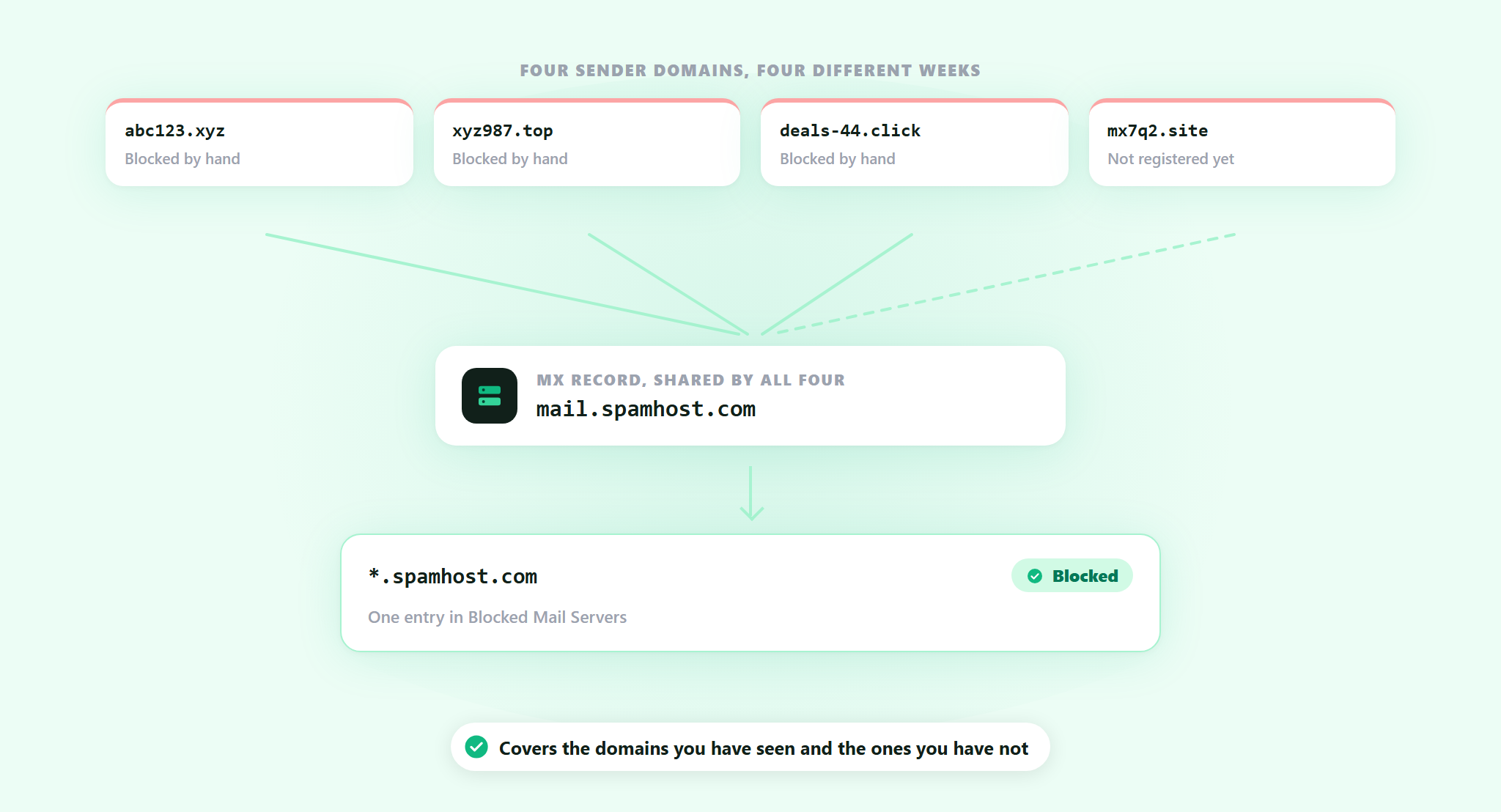
What those domains usually share is the mail infrastructure behind them. Different names, same mail servers. That part costs real money to move, so it changes far less often than the domain on the front.
Blocked Mail Servers is live. Block the mail host once and every domain running on it is covered, including the ones the spammer has not registered yet.
What you are actually blocking
Every domain that can receive email publishes MX records: the hostnames of the mail servers that handle its mail. It is public, and anyone can look it up. A batch of throwaway domains pointed at the same provider all publish the same MX hostnames, because they are all using the same machines.
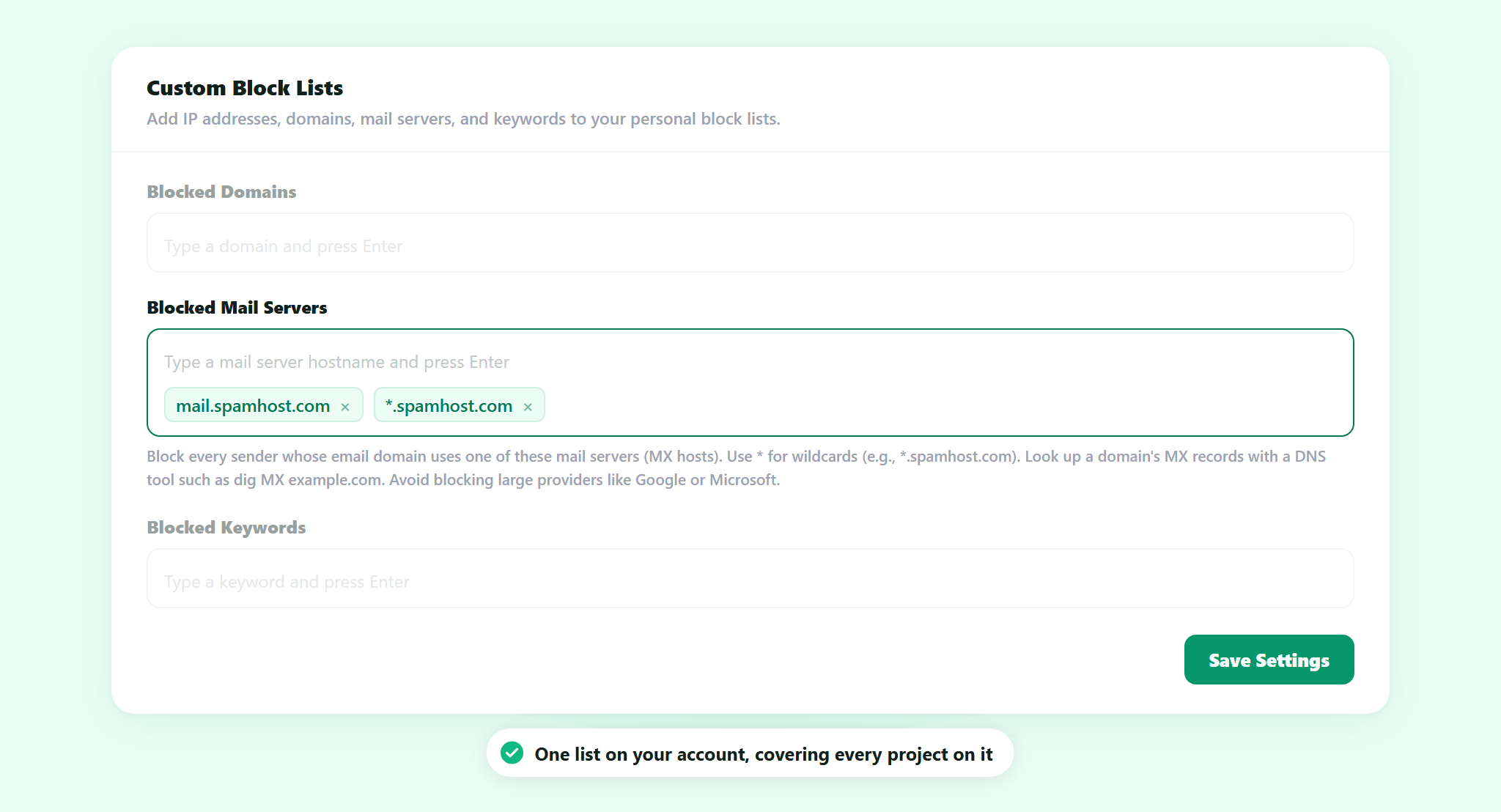
Blocked Mail Servers is a list of those hostnames. You enter them the way they appear in the records, like mail.spamhost.com, or you use a wildcard like *.spamhost.com to cover a whole provider in one line.
The difference from the list next to it is worth being clear about. Blocked Domains stops one domain. Blocked Mail Servers stops the machine behind it, and the next fifty domains that get pointed at it.
How the check runs
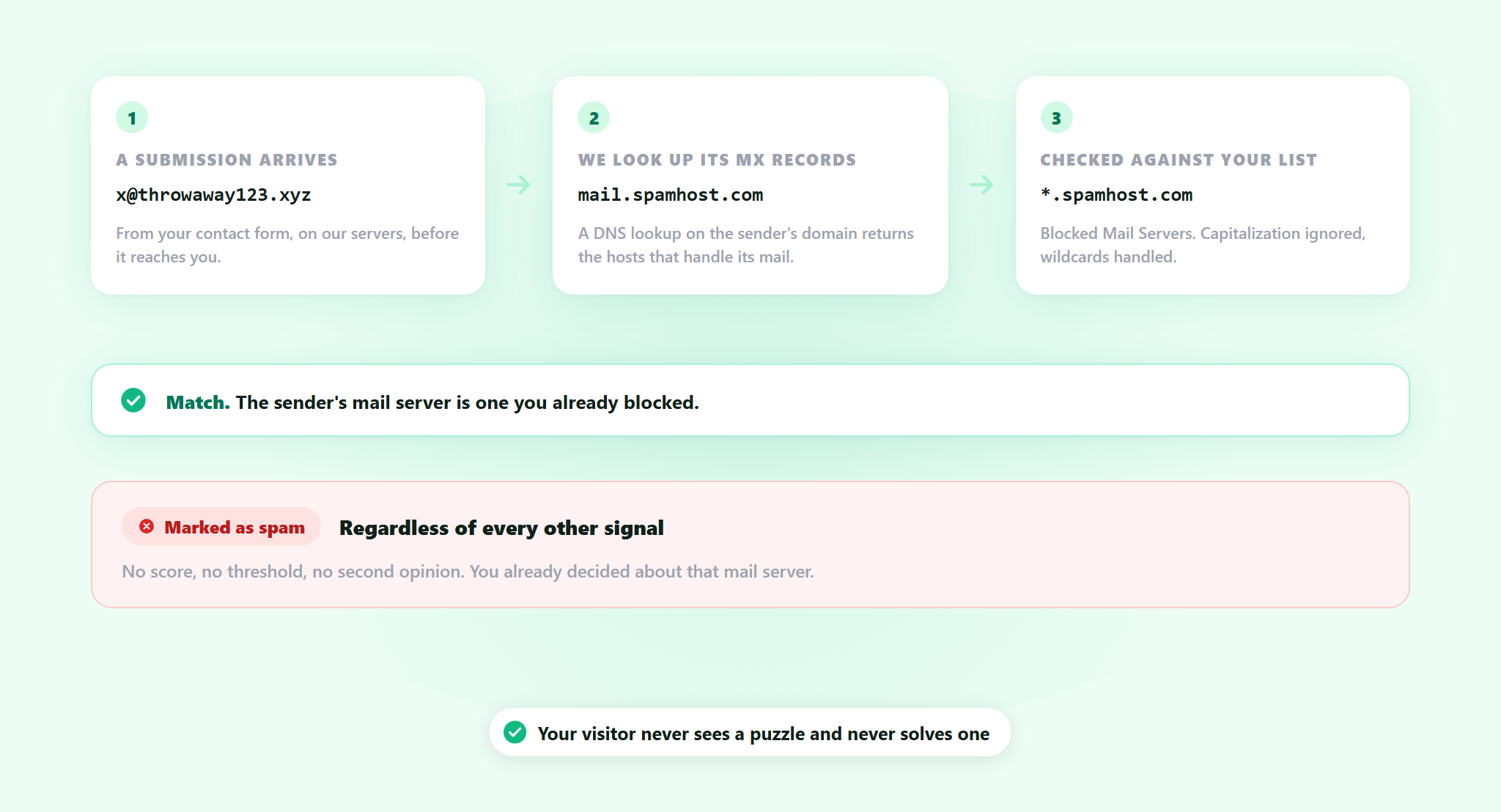
A submission arrives from an address like [email protected]. ActiveLayer looks up the MX records for throwaway123.xyz, takes the mail server hostnames that come back, and compares them against your list. Matching ignores capitalization, and wildcards are handled.
A match is final. The submission is marked as spam regardless of what every other signal says: no score, no threshold, no second opinion. You have already decided about that mail server, so nothing overrules you.
That is the whole point of the list, and it is also the reason to be careful about what goes on it.
One rule: do not block the big providers
The obvious mistake deserves naming out loud. Put Google’s mail servers on the list and you block every sender on Gmail. Put Microsoft’s on it and you block every sender on Outlook. Between them that is most of your real customers, and because a match is final, the filter will not save you from it.
The same mistake has a quieter version. A large shared host handles mail for thousands of unrelated businesses, so blocking its MX blocks all of them, including the supplier who has been emailing you for years.
This list is for the hosts that only ever send you spam. Look at what a hostname actually serves before you add it, and when you are not sure, add the one specific host rather than the wildcard.
Adding one to the list
1. Find the mail server
Take the sender domain off a spam submission you have already received, not one you are guessing at, and look up its MX records. Any MX lookup tool on the web does it in a second, and dig MX example.com does it from a terminal. What comes back is one or more hostnames.
2. Add the hostname
Open Spam Settings from the sidebar in app.activelayer.com. Blocked Mail Servers is the second list under Custom Block Lists, directly below Blocked Domains. Type the hostname, press Enter, and it becomes an entry. If a run of spam domains all point at the same provider, a single *.provider.com entry covers the ones you have seen and the ones you have not.
3. Save
Click Save Settings. It applies to submissions arriving from that point on. There is nothing to install, no code, and nothing changes for your visitors.
Where this one came from
A customer asked for it. Their spam was rotating sender domains faster than anyone could list them, and the mail servers behind those domains were not moving at all. They had already worked out where the real handle was. We built the setting that turns it.
If you are running into something ActiveLayer does not do yet, tell us. That is genuinely how this one happened.
Part of your spam settings
Blocked Mail Servers is one of five Custom Block Lists, second in the row, after Blocked Domains and ahead of Blocked Keywords, Blocked Email Addresses and Blocked IP Addresses. Nothing else changes. The AI check on the message, the sender signals and the behavioral signals all keep running exactly as they did, on our servers, where your visitors never see a puzzle and never solve one. What the new list adds is a hard override for the cases you have already identified yourself.
The list belongs to your account rather than to one project, so every project on the account is covered by the same entries. For an agency that is the whole point: block a mail server once and twenty client sites stop hearing from it, without touching twenty settings pages.
It is part of ActiveLayer on every plan, including the free one. There is no upgrade attached to it and no separate charge. The rest of the settings are covered in the documentation.
Get started
Open the last spam submission that got through, look up the sender domain’s mail server, and add it. The domain it came from will be gone by next week. The mail server will not.
Not sure whether a mail server is safe to block? Reach out. We read every message, and our team will help you get this running.
A spam check has a budget that most AI problems do not. Someone is sitting in front of a contact form with their finger on Send, and the answer has to arrive before they notice they are waiting. That is a few hundred milliseconds, total, including the network.
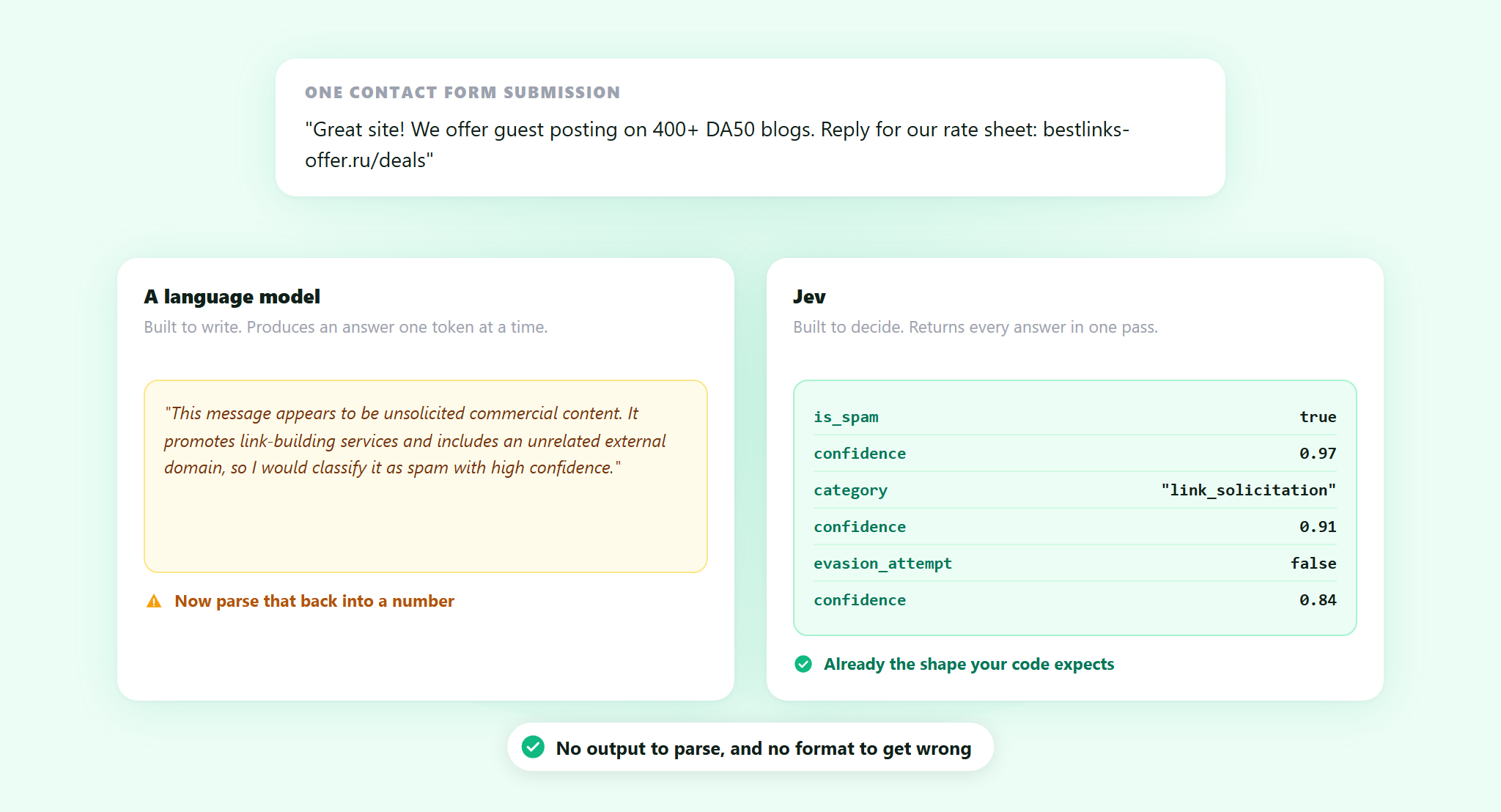
Large language models are very good at judging whether a message is junk. They are also built to write, which means they produce an answer one token at a time, and then something on our end has to read that text back and turn it into a number. For a filter that runs on every submission across thousands of sites, that is slow in exactly the place where slow is most visible.
So spam filters, ours included, lean on fast deterministic signals first and reach for the heavier model only where it earns its place. That works. It also means the sharpest judgment in the system is the part that is hardest to use everywhere.
ActiveLayer now runs Jev, a model built to make exactly that kind of call.
What Jev is
Jev comes from TypeSafe AI, a San Francisco company founded by Diogo Almeida, Erik Gafni and Sasha Sheng. It went into early access on 15 September 2026. TypeSafe calls it a System One model, and the defining property is easy to state: it does not write text.
You hand it a block of state, which can be an email, a log line, a form submission, a blob of JSON, along with a list of typed questions. It evaluates them in parallel and returns typed answers: a choice from a set you supplied, a score on a rubric you defined, or a probability on a yes or no question. Each answer carries its own calibrated confidence value.
Because the answer is drawn from a schema you provide rather than generated as a string, there is no output to parse and no format for the model to get wrong. It cannot invent a field, return prose where a number belongs, or wrap a verdict in an apology. TypeSafe reports end-to-end response times between 70 and 500 milliseconds.
The trade is real and worth stating plainly. Jev gives up the thing generative models are famous for. It cannot explain itself, cannot reason through several steps, and cannot handle a problem whose shape you have not decided in advance. It answers questions you already knew to ask.
Why that shape fits a spam check
A spam check is not an open question. It is a small, fixed set of decisions made under a latency budget, and the answer needs to be a number our code can threshold against, not a paragraph.
That is the same sentence twice. The description of what a System One model does and the description of what a spam filter needs are, for practical purposes, identical. Everything Jev gives up is something a spam check never wanted. Nobody needs the filter to explain itself in prose at the moment a form is submitted, and nothing downstream of the check can use a paragraph.
It also happens to be the case TypeSafe leads with. Their published evaluation sorted 19,528 emails into spam and legitimate mail with no training data at all, using a single yes or no question, and scored 96% accuracy. Writing a precise definition of what counted as spam took that to 98.3%, which matched a classifier trained on roughly 14,800 hand-labeled examples. Those are TypeSafe’s numbers, measured on their own harness and on email rather than on web form submissions.
Nothing had to be adapted to make the two meet. There was no adapter to write, no prompt to tune into returning clean JSON, no retry path for the times a model answers in the wrong format, and no parsing layer to maintain. You define the questions and the shape of the answers, and the answers come back in that shape. That is why the integration took a day rather than a sprint.
Anyone who has put a language model into a production path knows how much of that work there normally is, and how much of it is defensive: the schema validation, the repair prompts, the fallback for when a verdict arrives wrapped in an explanation nobody asked for. A model that cannot return a malformed answer deletes that entire category of code.
What went into our filter is a signal it did not have before, built on that model. A filter works with the signals available to it, and there is now one more.
Why five narrow questions beat one broad one
The speed is the headline. What matters more for a filter is that the questions are answered together.
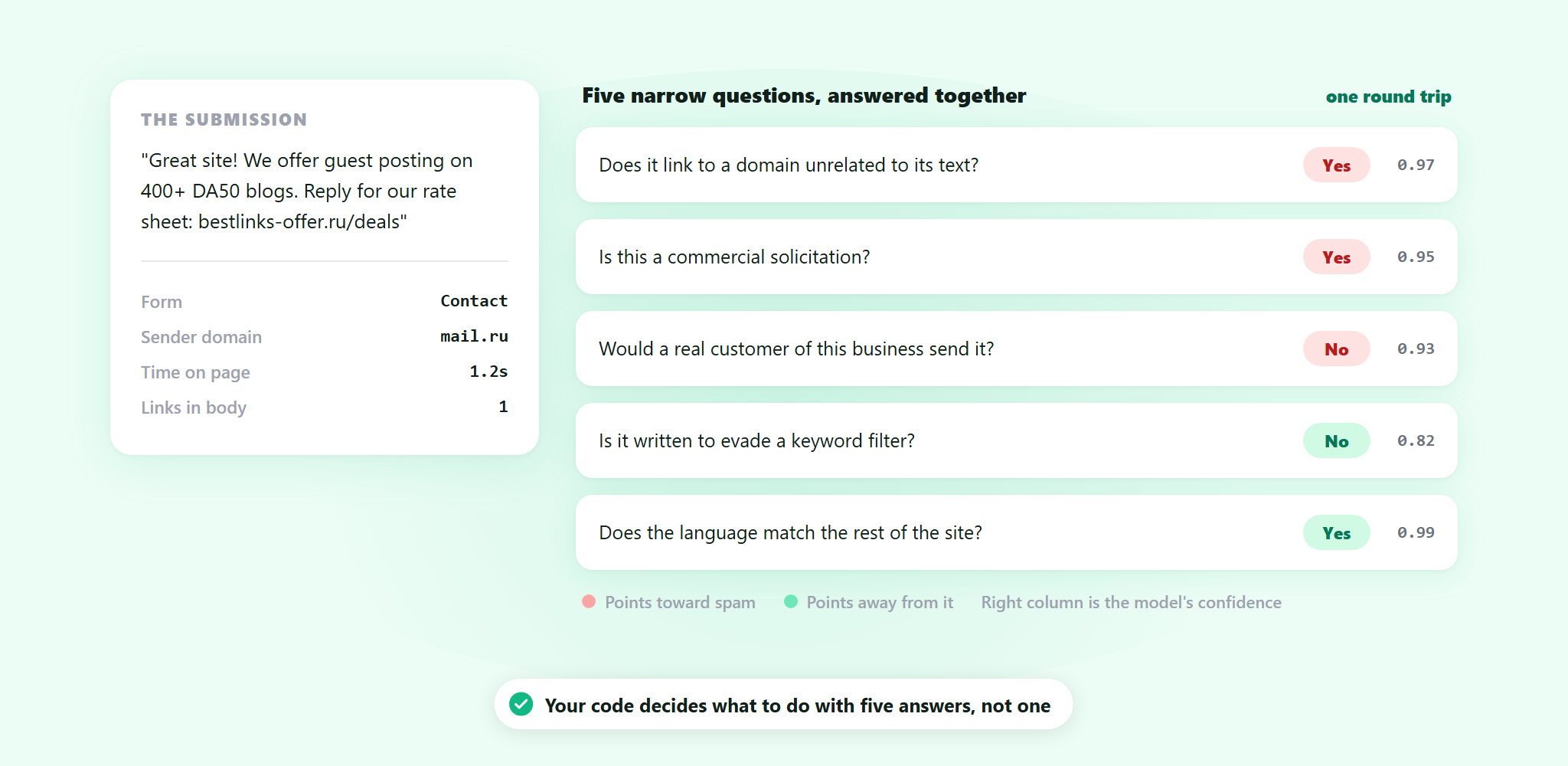
A model that generates text answers one question at a time, so every extra question you want to ask is another wait you cannot afford inside a form submission. Jev evaluates the whole list in a single pass. One round trip comes back with five answers instead of one, which means asking five narrow questions costs the same wait as asking one broad one.
Narrow questions are also the ones a filter gets right. “Is this spam” is a judgment call with a lot packed into it. “Does this message contain a link to a domain unrelated to its text”, “is this written to evade a filter”, “would a real customer of this business plausibly send this” are smaller, sharper, and each comes back with its own confidence value that our code can weigh separately. That matters most on the messages that are nearly right. A real customer writing in a hurry and a spammer imitating one look similar under a single verdict, and different under five.
What this means for your forms
Your contact form now sits behind a filter with a sharper judgment available to it on the messages that are hardest to call. Obvious junk was never the difficult part. The difficult part is the message where a real customer writing badly and a spammer writing carefully look the same, and that is the part this is aimed at.
There is nothing to install, nothing to configure and no setting to go and find. It came with the service you already have.
Everything else works the way it did. The check runs on our servers, so your visitors never see a puzzle, never sort through pictures of traffic lights, and never have to prove anything. If our API cannot be reached, the check fails open and the submission goes through, because a form that silently stops working is a worse outcome than a piece of spam.
Jev sits inside that system, not in place of it. The deterministic signals still run and they still catch most of what arrives, which is what keeps the whole thing fast.
Get started
ActiveLayer is server-side spam protection for forms and comments. Install the plugin, paste your API key, and submissions start being checked. It works with the form and membership plugins you already use, and the documentation covers the REST API if you are protecting something we do not have an integration for.
Not sure whether your forms are catching what they should? Reach out. We read every message, and our team will help you get this running.
You install something, it works, and you end up mentioning it to someone. A client whose contact form is drowning. A developer in a Slack channel asking what people use instead of CAPTCHAs. It happens constantly, and nothing has ever come back to you for it.
Refer & Earn is live. Share your link, and when someone you invited connects their first site, you both get 50 extra spam checks.
How it works
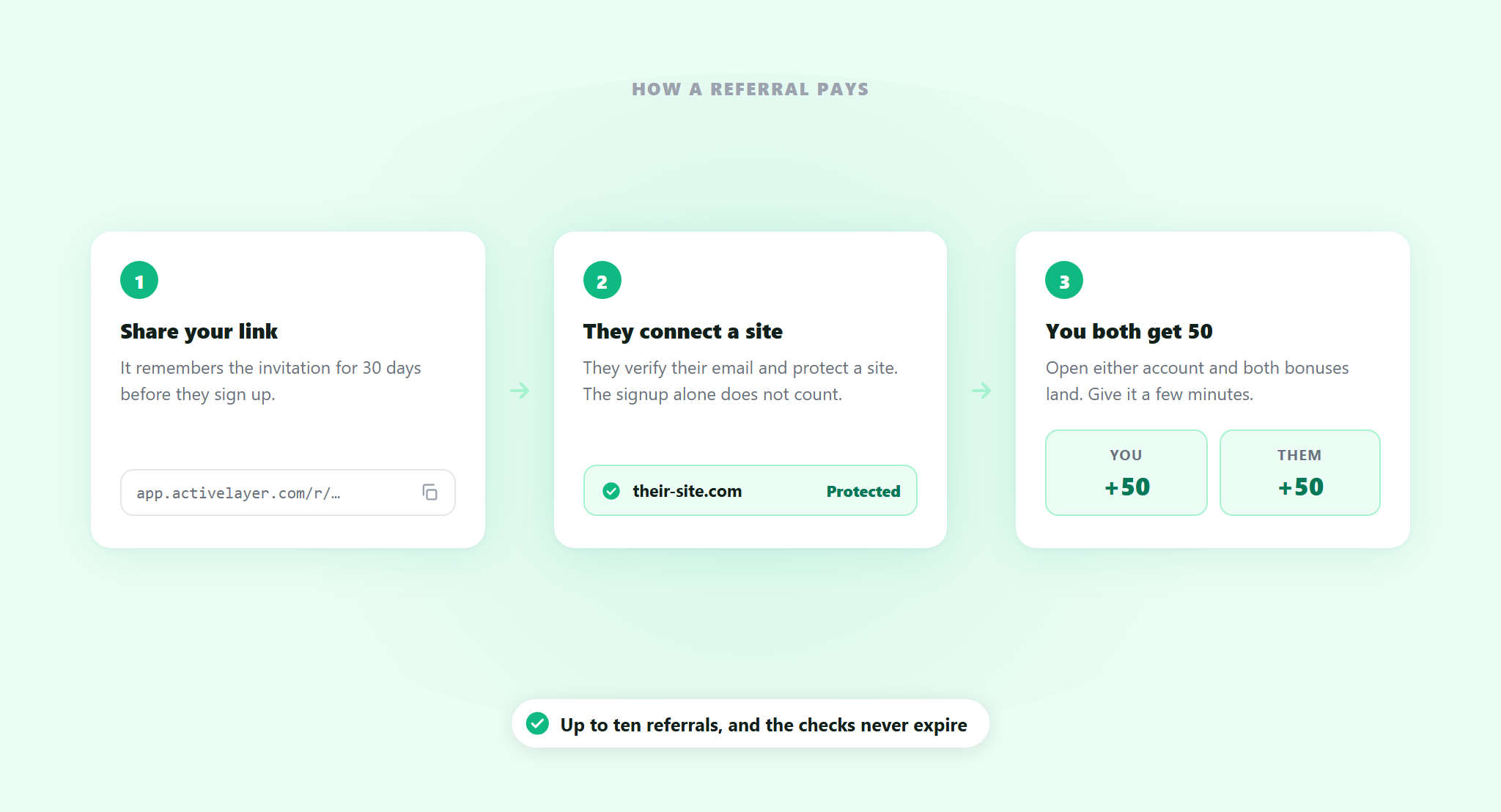
1. Share your link
Your invite link lives in Refer & Earn in your account. Copy it, or use the buttons for X, Threads, WhatsApp, LinkedIn, Facebook and email. The link remembers the invitation for 30 days, so someone who reads your message on a Tuesday and signs up three weeks later still counts.
2. They connect a site
They sign up, verify their email, and connect ActiveLayer on a site. That last part is the one that counts. A sign-up on its own does not earn anything, which is deliberate: the program rewards protecting a site, not filling in a form.
3. You both get 50
Fifty checks for you, fifty for them. Open either account once they have connected and both bonuses land.
What bonus checks are
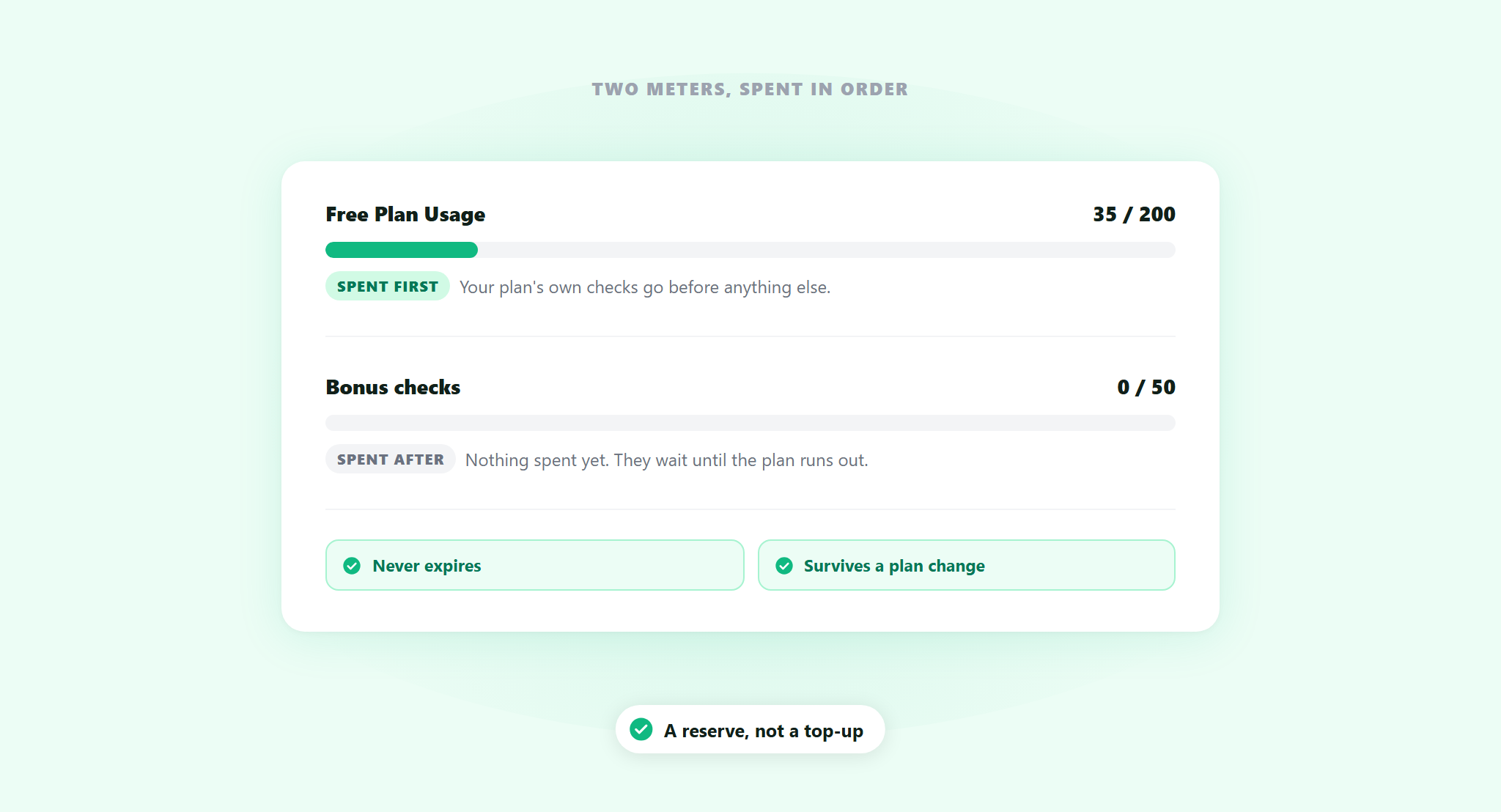
They are a second meter, separate from your plan. Your account shows both: the plan allowance you already had, and your bonus checks underneath it.
Bonus checks are spent only after your plan’s own allowance runs out. So they sit there as a reserve, untouched, until you need them. They never expire. And they stay with you if you change plan, which matters if you are on the free plan now and move to Pro later.
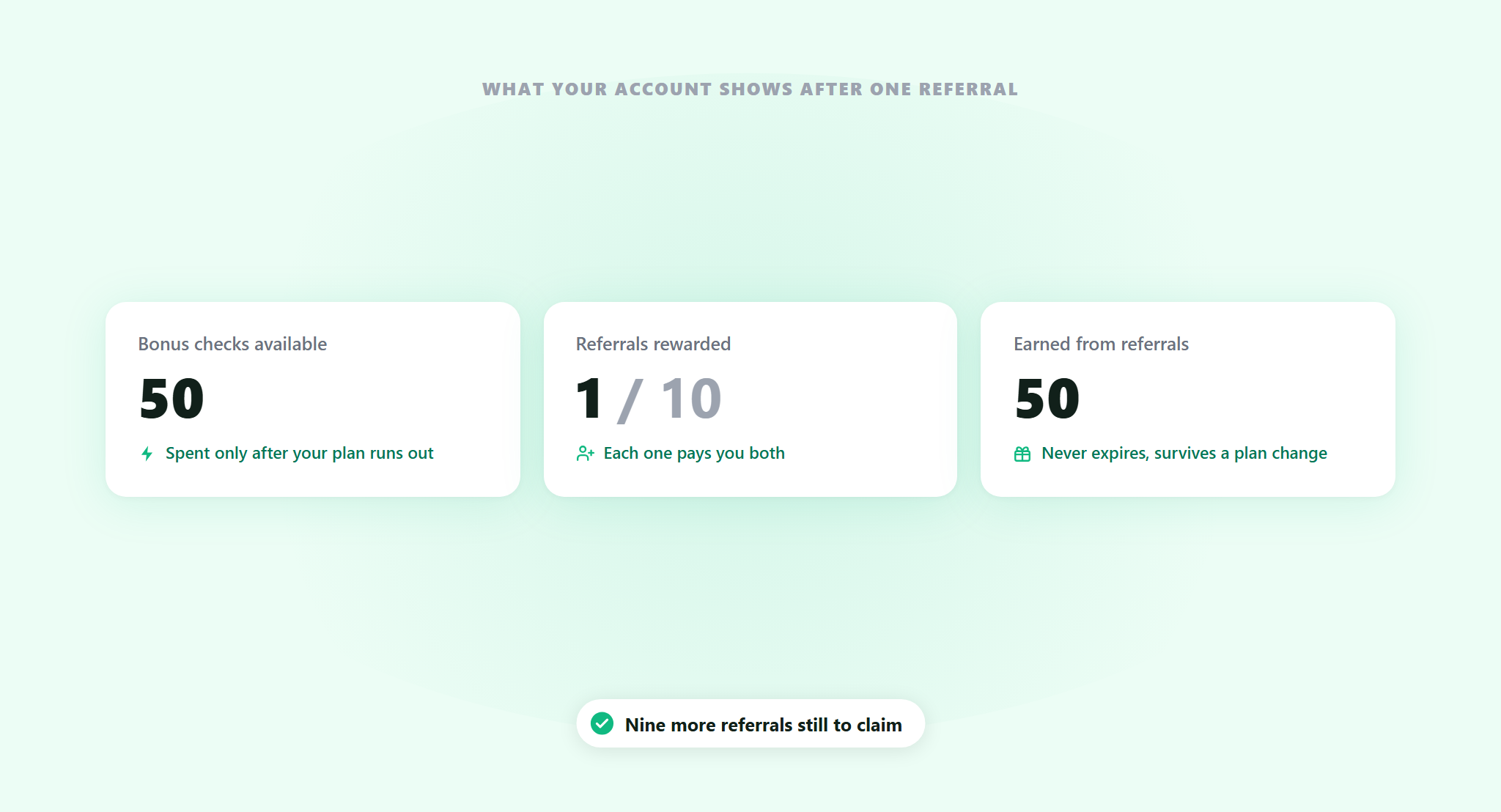
The cap is ten rewarded referrals. Ten people who connect a site is 500 bonus checks, on top of whatever your plan gives you.
Adding a card earns 100 additional checks
Separate from referrals, adding a payment method to your account earns 100 bonus checks. You are not charged for adding one, and those checks never expire either.
The rules, plainly
- One site, one reward. If a site is already connected to another ActiveLayer account, it does not earn again. The check is on the site, not the account.
- Ten referrals maximum. After that, further referrals stop earning.
- Thirty days to sign up. The link remembers who sent them for a month.
- The connection is what pays, not the sign-up. Someone who registers and never protects a site earns nobody anything.
Who to send it to, and when
Anyone who hands finished sites to other people. The reward is for someone else running their own ActiveLayer account, so a client who signs up and connects their own site counts, while ten sites under your own account do not. Agencies and freelancers do the first thing repeatedly, and ten of those is 500 checks back.
It also works if you have never referred anyone in your life. The card bonus is 100 checks for a thirty-second task you were probably going to do anyway.
An invite link is worth nothing sitting in your account. The ones that get used are the ones sent at the moment somebody has the problem.
Someone posts that their contact form is getting forty submissions a day and every one of them is junk. A client emails asking why the spam suddenly got worse. A developer asks what people use now, because they are tired of making visitors identify traffic lights. You were going to answer those anyway. Sending your link instead of just naming the plugin takes the same effort.
One thing worth saying when you send it: they get 50 too. That makes it a much easier message to write.
What 50 checks is worth
The free plan is 200 checks in total, one time. So a single referral adds a quarter of that, ten referrals adds two and a half times it, and the card adds half of it again. On a small site that is real breathing room.
On Pro it works differently. Your monthly allowance resets and the bonus sits underneath it, untouched, until a month comes along where you go over.
Get started
Open Refer & Earn in your account, copy your link, and send it to the next person who complains about form spam.
Questions about your site’s specific setup? Reach out. We read every message, and our team will help you get this running.
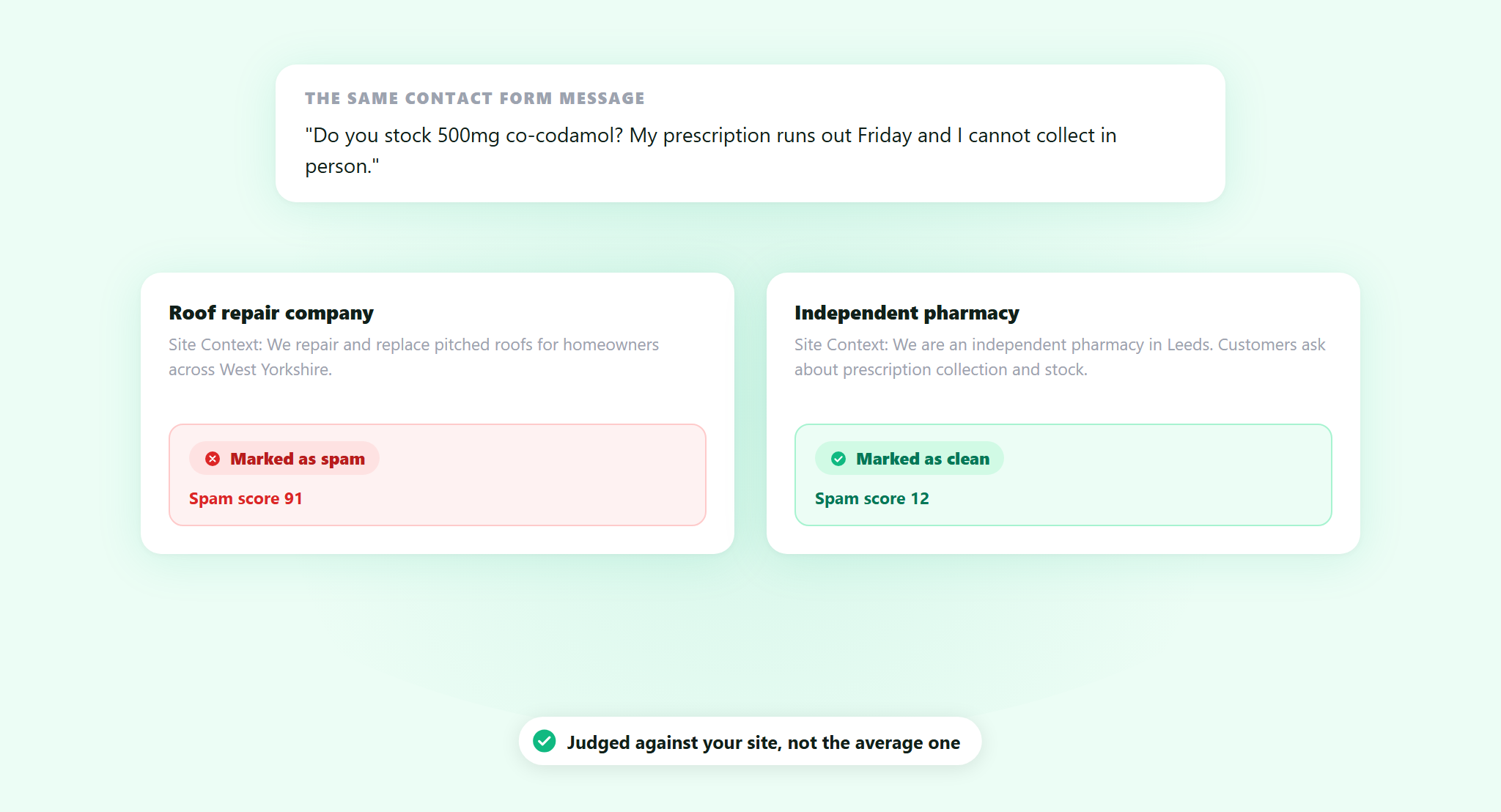
A message comes in through your contact form. It mentions dosages, a prescription, and a brand name for a painkiller. Is that spam?
If you run a roof repair company, almost certainly. If you run a pharmacy, that is a customer asking a normal question, and blocking it costs you a sale and probably a phone call complaining about your website.
ActiveLayer already reads a lot before it decides: the words, the links, the sender, the sending patterns and the behavioral signals. It does that well. What it had no way to know was the one thing you know without thinking: what your site is actually for. So a filter tuned to catch pharmaceutical spam across the whole web will sometimes catch a pharmacy.
Site Context is live. Tell the spam filter what your business does, and it judges against your site instead of against a generic idea of spam.
What Site Context changes
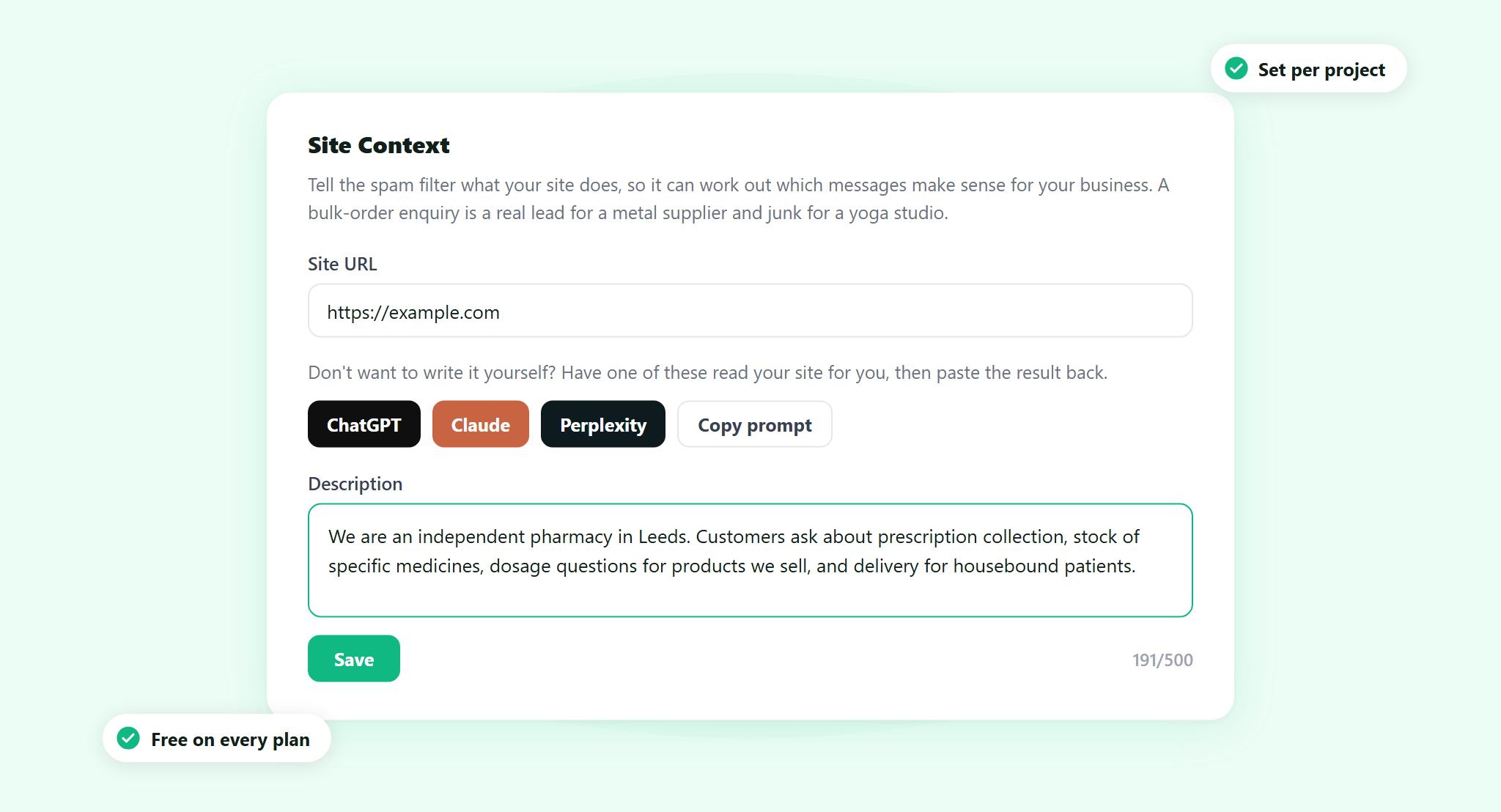
Site Context is a short description of your business that lives in your project’s settings, next to your site’s address. Two or three sentences: what you sell or do, who your customers are, and what your contact form legitimately receives.
The setting lives on the project. The same message can be a lead on one site and junk on another, and the filter now has enough to tell the difference. A bulk order inquiry is a real lead for a metal supplier and noise for a yoga studio. A message full of legal terminology belongs on a law firm’s form and nowhere near a bakery’s.
Leave it blank and nothing breaks. Your protection works exactly as it did before, judged against a general model of what spam looks like. Site Context is the difference between a filter that knows spam and a filter that knows your spam.
You do not have to write it yourself
A blank text box asking you to describe your own business is a small task that somehow takes twenty minutes. You know what your company does. Compressing it into three useful sentences is a different job.
So next to the field there are three buttons: ChatGPT, Claude and Perplexity. Each one opens that tool in a new tab with the prompt already written and your site’s address already in it. The assistant reads your site and writes the description, you copy it, and you paste it into the field. There is a Copy prompt button as well, if you use a different assistant. All four switch on once your Site URL is filled in, since that is what the prompt points at.
The prompt asks for the same three things every time: what the business sells or does, who its customers are, and what kinds of inquiries the contact form legitimately receives. Two or three sentences, under 500 characters, no preamble.
Nothing is connected. These are shortcuts that save you writing the prompt, not an integration. ActiveLayer does not call those tools, does not read anything back, and never sees the description until you paste it in and press Save. You see every word before it counts for anything.
Who this matters most for
It is worth setting on any site. It matters most on the ones where legitimate customers write things that look exactly like spam:
- Medical, dental and pharmacy. Patients name drugs and conditions. So do spambots.
- Legal and financial services. Real inquiries mention debt, settlements, claims and large sums, in the same vocabulary as the scams.
- B2B and wholesale. A stranger asking about bulk pricing and lead times is your best lead of the week, and reads like a template.
- Agencies and freelancers. Cold inquiries from people you have never met are the entire business model.
- Anything regional or non-English. A form that mostly receives one language has an obvious boundary, and the filter has no way to know it unless you say so.
If you have ever fished a real customer out of your spam folder, this is the setting for you.
Setting it up takes about a minute
1. Open the project’s settings
In app.activelayer.com go to Projects and click the gear icon on that project’s row. If you are already inside the project, the Settings button is at the top right. Site Context is the only thing on that page.
2. Fill in the Site URL
On a WordPress project this appears on its own once the plugin connects. On a brand new project, or one running straight off the API, it starts empty and you type it in. It is worth doing first: the generate buttons stay switched off until it is there.
3. Write the description, or generate it
Up to 500 characters, with a counter so you can see where you are. Click Save. The rest of the plugin’s settings are covered in the documentation.
That is the whole setup. It applies from the moment you save, on that project, whether your submissions arrive through the WordPress plugin or straight from the API. Nothing to install, no code, and nothing changes for your visitors.
How to write a context that actually helps
The filter is not reading your marketing. It is looking for the boundary between a message that makes sense for you and one that does not. Concrete beats polished.
This works: “We are an independent pharmacy in Leeds. Customers ask about prescription collection, stock of specific medicines, dosage questions for products we sell, and delivery for housebound patients.”
Thirty seconds to write, and it does the job. It names what the business is, who writes in, and what a real message asks for. The prescription inquiry from the top of this post fits that description. A note about discount pharmaceuticals from an unknown sender does not.
This does not: “We are a leading provider of innovative solutions, committed to excellence and customer satisfaction.”
That describes nothing. It fits a metal supplier, a yoga studio and a spambot equally well, so it gives the filter no boundary to work with. If your description would look fine on someone else’s homepage, rewrite it.
Three habits worth having. Name the actual products or services, not the category. Say what a normal inquiry asks for. Mention your language or region if your form mostly receives one.
Available on every plan
Site Context is part of ActiveLayer for everyone, including the free plan. There is no upgrade attached to it and no separate charge. Set it per project, so an agency running twenty client sites can give each one its own description.
Get started
Open a project, write three sentences about your business, and save. From then on your site is what the filter compares against, not the average site on the internet.
Questions about your site’s specific setup? Reach out. We read every message, and our team will help you get this running.