
Contact Form 7 Spam Protection
Stop Contact Form 7 Spam Without reCAPTCHA
While other spam tools load JavaScript widgets and force visitors to solve puzzles, ActiveLayer blocks CF7 spam inline before the submission even completes. No reCAPTCHA. No friction. No lost leads. Setup takes two minutes.
✓ Lightning-fast response
✓ 99.5%+ accuracy
✓ Zero CAPTCHAs
✓ 200 free checks (one-time)
Built by Awesome Motive, whose software is trusted by 30,000,000+ websites worldwide.






Everything CF7 Needs to Finally Beat Spam
Forget wrestling with reCAPTCHA widgets, quiz fields, and honeypot hacks that don’t work.
Inline Spam Blocking
CF7 runs synchronously. ActiveLayer blocks spam before the submission completes. No queues, no delays.
Zero reCAPTCHA Widget
No JavaScript widget loaded. No checkbox. No image puzzles. Your form stays clean and fast.
Field Tagging System
Add activelayer:name, activelayer:email, activelayer:message, activelayer:url to CF7 tags for maximum detection accuracy.
Per-Form Control
Enable ActiveLayer on specific forms. Edit any form, open the ActiveLayer tab, tick the checkbox. Done.
Global Enable Option
Protect every CF7 form at once from ActiveLayer Settings. One toggle covers your entire site.
AI-Powered Detection
Analyzes content patterns, sender reputation, and behavioral signals. 99.5%+ accuracy across all submission types.
Tracking Mode
Test ActiveLayer without blocking anything. See what would be flagged before enforcing protection.
Standard CF7 Spam Message
Clean submissions proceed immediately. Spam shows CF7’s native spam message. No custom error pages or redirects.
No Client-Side Scripts
Nothing loads in your visitors’ browsers. No cookies, no tracking, no impact on page speed.
Three Steps to Spam-Free CF7 Forms
No developer needed. No configuration headaches. Just protection.
1
Install and Connect
Install the ActiveLayer plugin, enter your API key, and enable Contact Form 7 protection from ActiveLayer Settings.
2
Tag Your Fields for Best Accuracy
Add field tags like activelayer:name and activelayer:email to your CF7 form tags. This tells ActiveLayer exactly which fields to analyze for the most accurate detection.
3
You’re Protected. Spam Is Blocked Inline.
Every submission is checked in milliseconds. Spam is blocked before the form completes. Clean submissions go through instantly. Your visitors never know it’s there.
Why CF7 Users Switch to ActiveLayer
Stopping Contact Form 7 spam isn’t luck. It’s a system.
Your Inbox Belongs to Real Customers Again
Contact Form 7’s 5 million+ installs make it the most targeted WordPress form plugin by spammers — and CF7’s built-in quiz field and reCAPTCHA barely slow them down. ActiveLayer replaces all of it with AI-powered detection that analyzes content patterns, sender reputation, and behavioral signals. 99.5%+ accuracy. Your inbox fills with real leads, not spam.

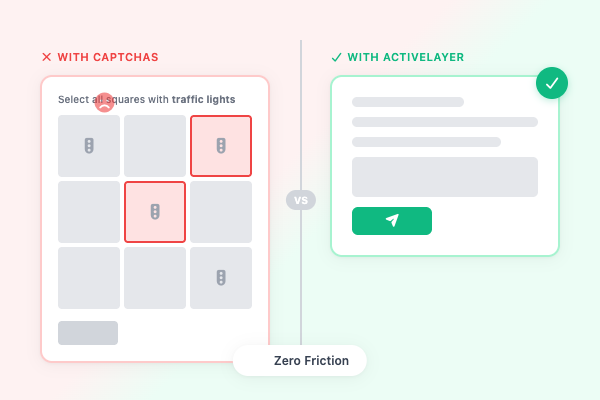
Invisible Protection That Never Blocks a Real Customer
CF7’s reCAPTCHA integration loads Google’s JavaScript widget, adding script weight and a checkbox or puzzle between your visitor and the submit button — CAPTCHAs reduce form completions by up to 40%. ActiveLayer is entirely server-side: no widget loads, no script runs. Your visitors fill out the form, hit submit, and move on. You get the lead, not the bounce.
Spam Dies Before the Submission Completes
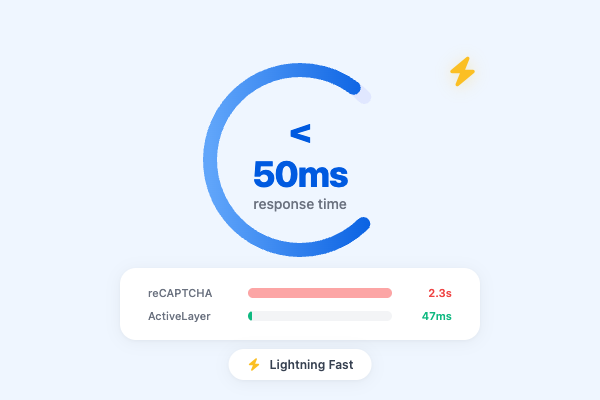
Contact Form 7 runs synchronously with ActiveLayer — when a visitor hits submit, ActiveLayer returns a verdict in milliseconds. Spam is blocked inline and the visitor sees CF7’s standard spam message. Clean submissions proceed immediately. No processing queue, no spam sitting in your inbox.
Tell ActiveLayer Exactly What to Analyze
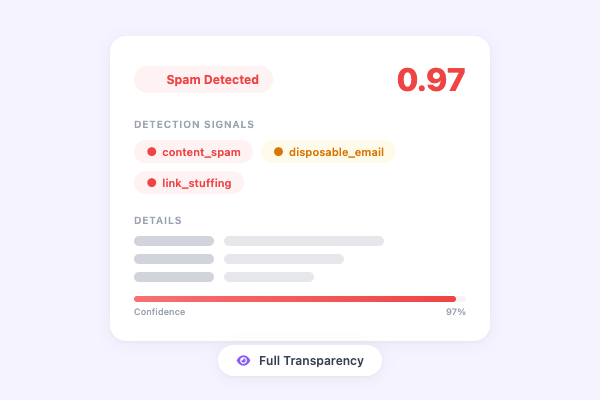
ActiveLayer’s field tagging system lets you label CF7 fields so the AI knows what it’s analyzing: add activelayer:name, activelayer:email, activelayer:message, and activelayer:url to the corresponding fields. This gives ActiveLayer the context to apply the right detection signals to the right content. Better context means better accuracy — and zero false positives.
Frequently Asked Questions
Have questions about ActiveLayer for Contact Form 7? We’ve got answers.
Two options. Enable globally from ActiveLayer Settings by turning on the Contact Form 7 toggle. Or enable per form by editing any CF7 form, opening the ActiveLayer tab, and ticking “Enable ActiveLayer spam protection.”
Yes. ActiveLayer replaces CF7’s reCAPTCHA integration, quiz field, and any other anti-spam add-on with invisible AI-powered protection. No widget loads, no JavaScript runs, and your visitors never see a challenge.
Field tagging tells ActiveLayer which form fields contain names, emails, messages, and URLs. Add options like activelayer:name or activelayer:email to your CF7 tags. It’s optional but recommended for the best detection accuracy.
Yes. ActiveLayer works alongside CF7 add-ons like Conditional Fields, Flamingo, and other extensions. It hooks into CF7’s spam filtering system natively, so existing add-ons continue to function normally.
The visitor sees CF7’s standard spam message. The submission is blocked inline before it completes. Clean submissions proceed immediately with no delay.
Tracking Mode lets you test ActiveLayer without blocking any submissions. It logs what would be flagged as spam so you can verify accuracy before enforcing protection. Turn it off when you’re ready to block.
The free plan includes 200 spam checks in total. No credit card required. Pro is $19/month for 25,000 checks. Upgrade anytime as your volume grows.