
You block a spam domain. The next morning, the same messages arrive from a domain you have never seen, and the one after that is different again.
Throwaway domains are cheap. A spammer registers them in batches, burns through them and registers more. Blocking them one at a time is a queue that never gets shorter, and every entry you add is already out of date by the time you save it.
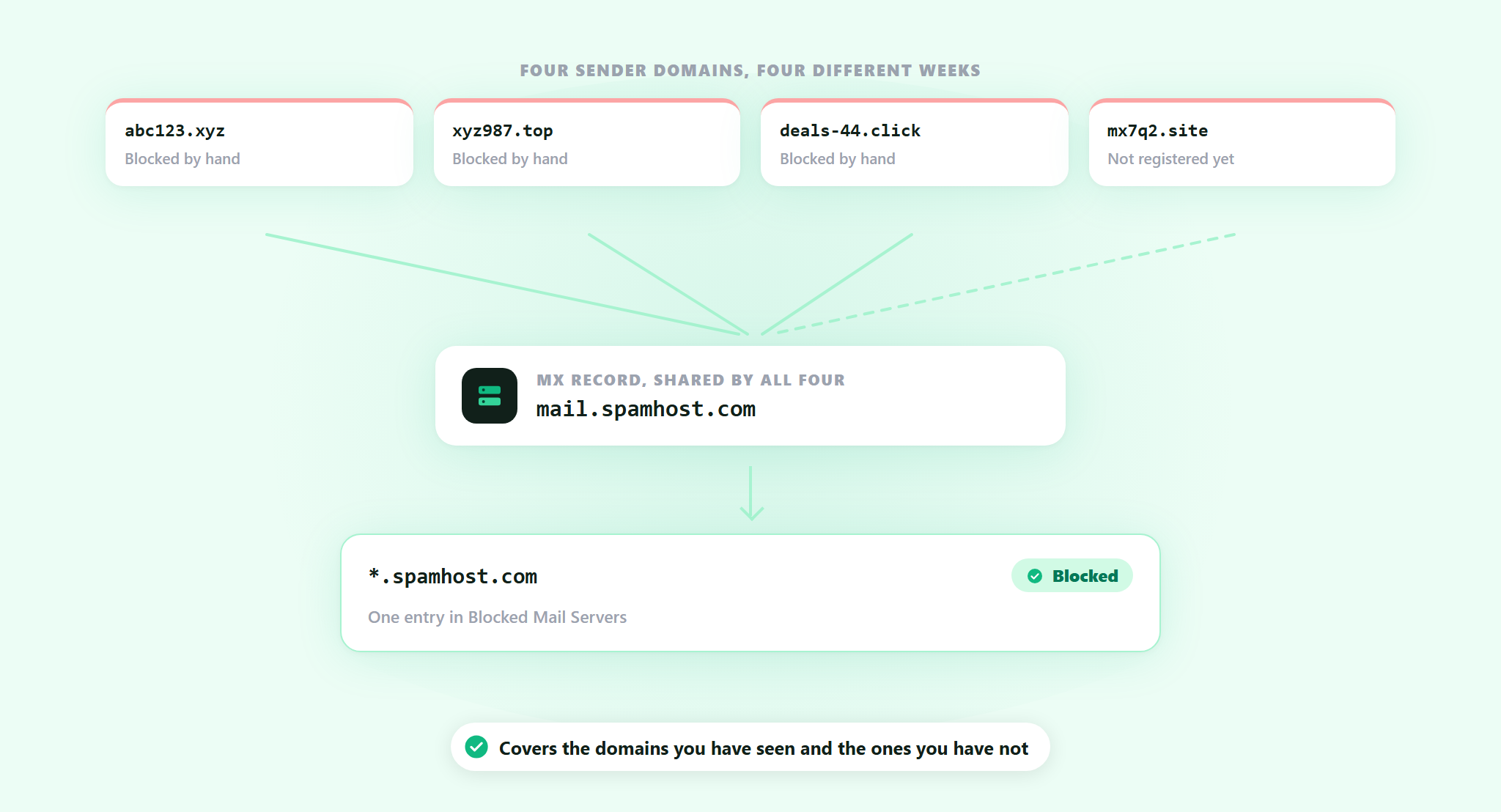
What those domains usually share is the mail infrastructure behind them. Different names, same mail servers. That part costs real money to move, so it changes far less often than the domain on the front.
Blocked Mail Servers is live. Block the mail host once and every domain running on it is covered, including the ones the spammer has not registered yet.
What you are actually blocking
Every domain that can receive email publishes MX records: the hostnames of the mail servers that handle its mail. It is public, and anyone can look it up. A batch of throwaway domains pointed at the same provider all publish the same MX hostnames, because they are all using the same machines.
Blocked Mail Servers is a list of those hostnames. You enter them the way they appear in the records, like mail.spamhost.com, or you use a wildcard like *.spamhost.com to cover a whole provider in one line.
The difference from the list next to it is worth being clear about. Blocked Domains stops one domain. Blocked Mail Servers stops the machine behind it, and the next fifty domains that get pointed at it.
How the check runs
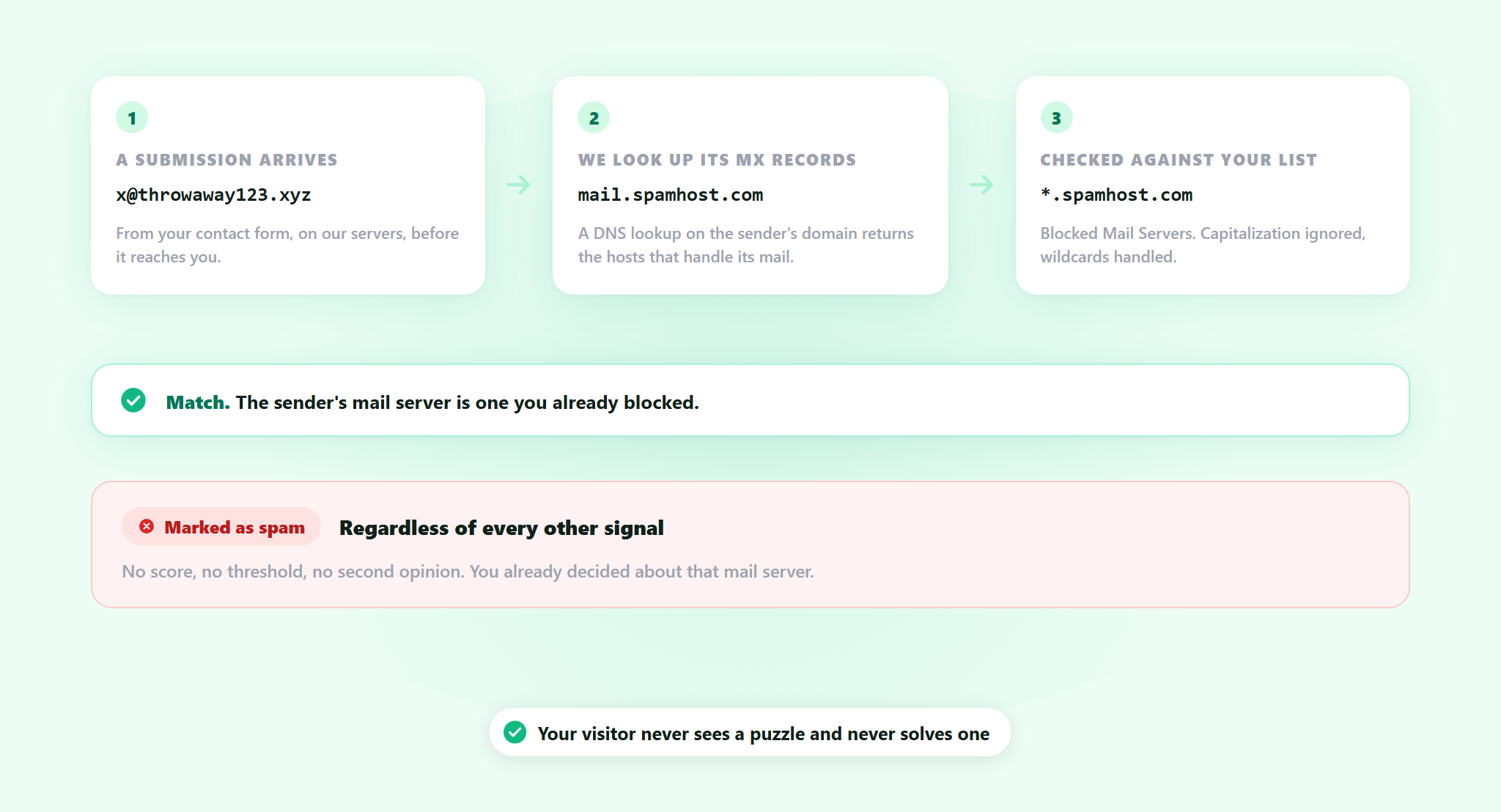
A submission arrives from an address like [email protected]. ActiveLayer looks up the MX records for throwaway123.xyz, takes the mail server hostnames that come back, and compares them against your list. Matching ignores capitalization, and wildcards are handled.
A match is final. The submission is marked as spam regardless of what every other signal says: no score, no threshold, no second opinion. You have already decided about that mail server, so nothing overrules you.
That is the whole point of the list, and it is also the reason to be careful about what goes on it.
One rule: do not block the big providers
The obvious mistake deserves naming out loud. Put Google’s mail servers on the list and you block every sender on Gmail. Put Microsoft’s on it and you block every sender on Outlook. Between them that is most of your real customers, and because a match is final, the filter will not save you from it.
The same mistake has a quieter version. A large shared host handles mail for thousands of unrelated businesses, so blocking its MX blocks all of them, including the supplier who has been emailing you for years.
This list is for the hosts that only ever send you spam. Look at what a hostname actually serves before you add it, and when you are not sure, add the one specific host rather than the wildcard.
Adding one to the list
1. Find the mail server
Take the sender domain off a spam submission you have already received, not one you are guessing at, and look up its MX records. Any MX lookup tool on the web does it in a second, and dig MX example.com does it from a terminal. What comes back is one or more hostnames.
2. Add the hostname
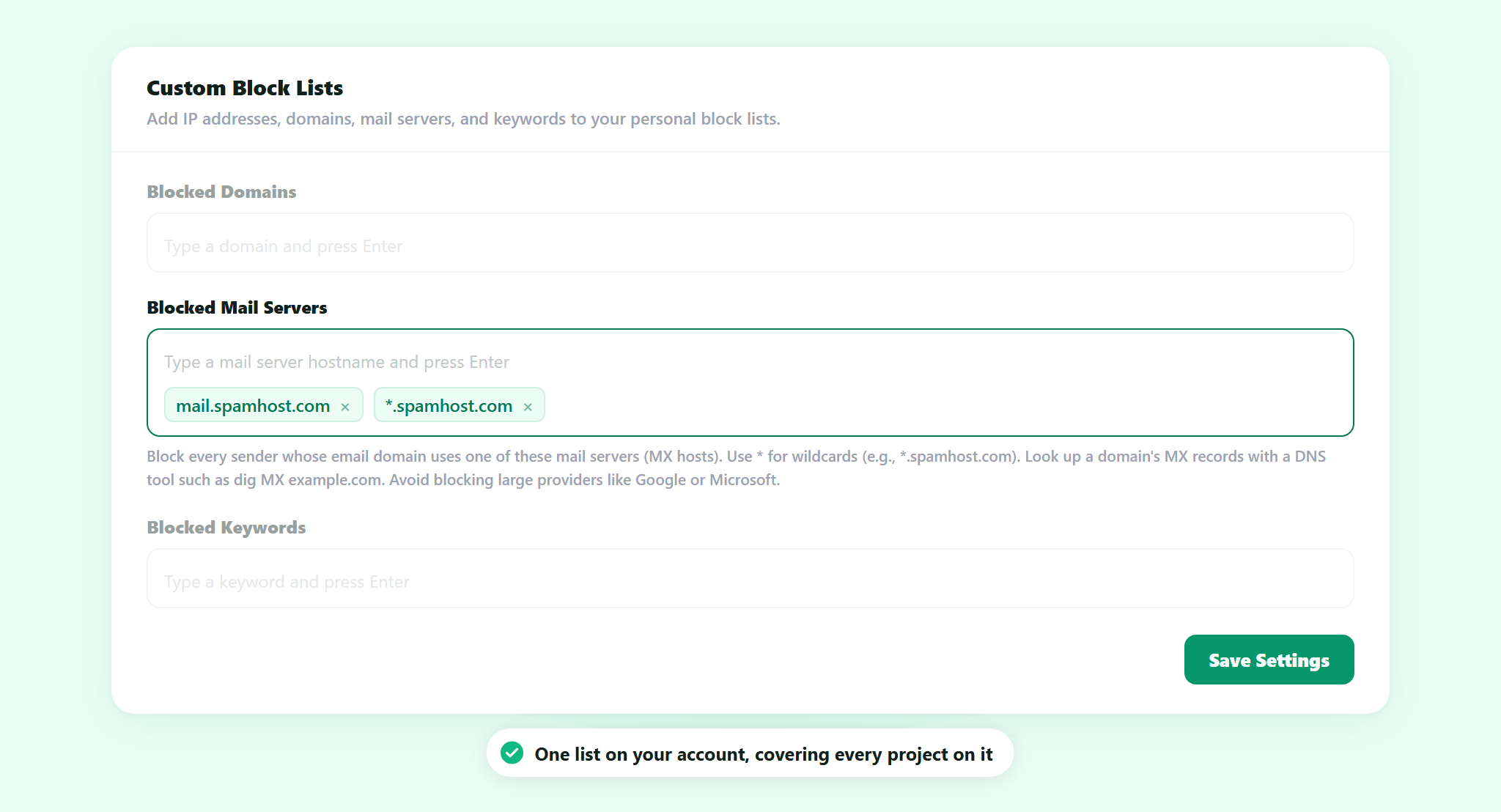
Open Spam Settings from the sidebar in app.activelayer.com. Blocked Mail Servers is the second list under Custom Block Lists, directly below Blocked Domains. Type the hostname, press Enter, and it becomes an entry. If a run of spam domains all point at the same provider, a single *.provider.com entry covers the ones you have seen and the ones you have not.
3. Save
Click Save Settings. It applies to submissions arriving from that point on. There is nothing to install, no code, and nothing changes for your visitors.
Where this one came from
A customer asked for it. Their spam was rotating sender domains faster than anyone could list them, and the mail servers behind those domains were not moving at all. They had already worked out where the real handle was. We built the setting that turns it.
If you are running into something ActiveLayer does not do yet, tell us. That is genuinely how this one happened.
Part of your spam settings
Blocked Mail Servers is one of five Custom Block Lists, second in the row, after Blocked Domains and ahead of Blocked Keywords, Blocked Email Addresses and Blocked IP Addresses. Nothing else changes. The AI check on the message, the sender signals and the behavioral signals all keep running exactly as they did, on our servers, where your visitors never see a puzzle and never solve one. What the new list adds is a hard override for the cases you have already identified yourself.
The list belongs to your account rather than to one project, so every project on the account is covered by the same entries. For an agency that is the whole point: block a mail server once and twenty client sites stop hearing from it, without touching twenty settings pages.
It is part of ActiveLayer on every plan, including the free one. There is no upgrade attached to it and no separate charge. The rest of the settings are covered in the documentation.
Get started
Open the last spam submission that got through, look up the sender domain’s mail server, and add it. The domain it came from will be gone by next week. The mail server will not.
Not sure whether a mail server is safe to block? Reach out. We read every message, and our team will help you get this running.