WS Form spam protection comes down to one moment: what happens after someone hits submit. The entry gets written to your database. Your form actions fire. Notification emails go out, webhooks ping your CRM, and your team gets paged about a lead that was never real.
That is the part that costs you. A junk entry is one more row to sift through, one more email you learn to ignore, one more integration call you pay for. The forms doing the damage are the everyday ones: contact forms, lead forms, signup forms, the payment form on your pricing page. The ones you actually need open to the public.
The usual answer is a CAPTCHA bolted onto every form. It nags the real people filling out your forms, and the bots that learned to read puzzles submit anyway. You lose the visitor and keep the spam.
There is a better place to catch them.
Today, ActiveLayer ships native WS Form spam protection. Every submission is scored by AI on the server, before WS Form saves the entry or runs a single action. No puzzles. No checkboxes. Real visitors never see a thing.
How ActiveLayer stops WS Form spam
1. Every submission, checked before it’s saved
Your public forms are the one place that has to stay open to strangers. That is the whole point of them, and exactly why bots fill them. The fields are predictable, the URL is public, and a successful submit becomes a stored entry that triggers your actions. So we guard the submission itself.
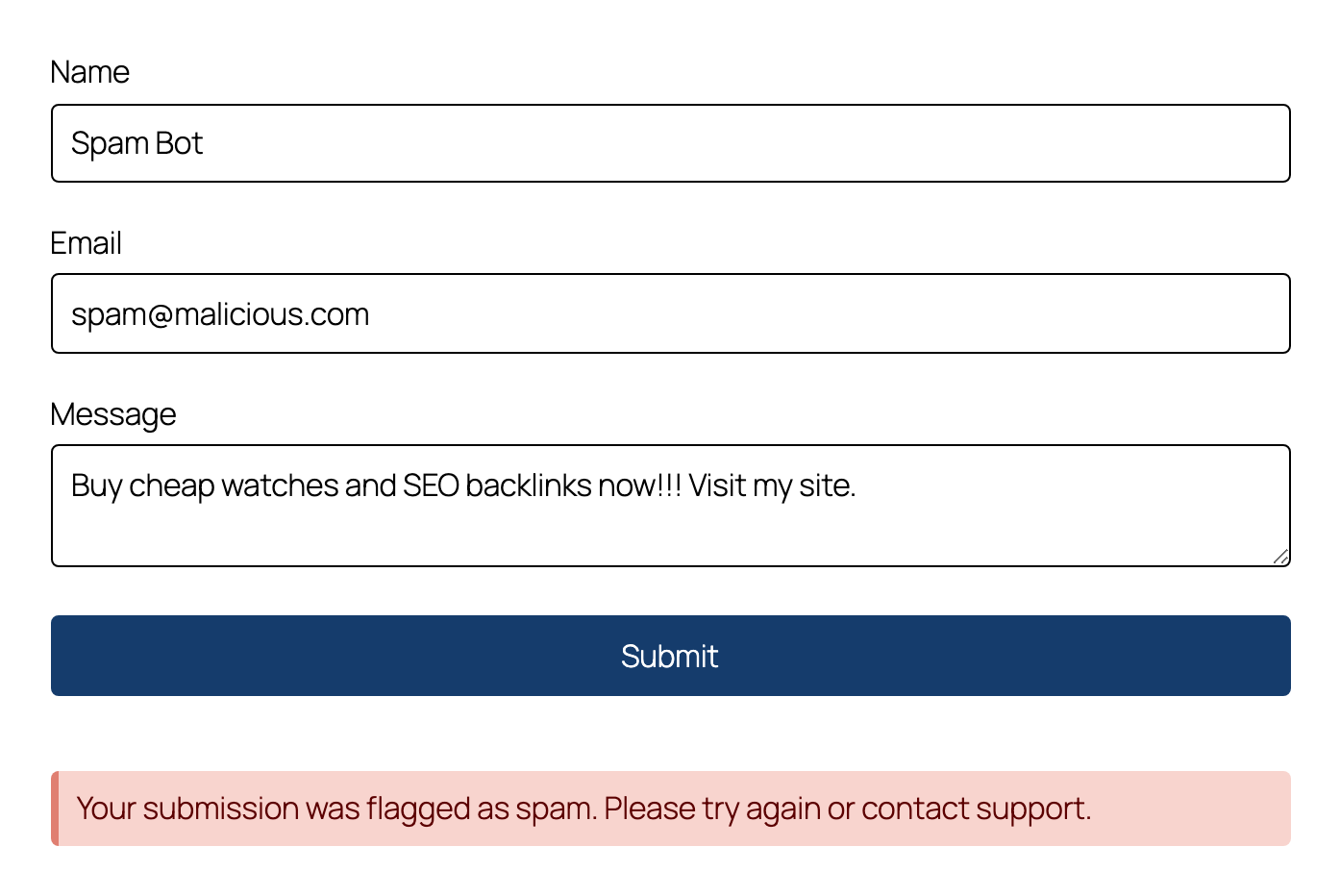
ActiveLayer scores each submission on the server in the same request. The check is synchronous, and it runs inside WS Form’s own validation, before the entry is written. A clean submission goes through untouched and your actions run as normal. A spam submission is stopped cold: the form returns an inline error, and no entry is saved and no action ever fires.
A few details we cared about:
- It runs before the entry is saved and before any action runs. A blocked bot never lands in your entry list, never sends you a notification email, and never reaches the webhook or CRM on the other end of your form.
- It covers the spoofable path too. WS Form’s public
actionpost mode can be poked directly, skipping conditional logic but still saving the entry and running Send Email. ActiveLayer checks that path exactly like a normal submit, so there is no side door. - The blocked visitor sees one plain message, “Your submission was flagged as spam. Please try again or contact support.” No stack trace, no clue about what tripped it.
You also decide which forms get checked. Protection is on for every form the moment your key connects, and each form carries its own switch. Open a form, go to the Spam tab, and you’ll find an ActiveLayer fieldset with a single Enable checkbox. Turn it off for a form and that form alone stops being checked. The same per-form toggle is mirrored on the ActiveLayer Integrations screen, so you can manage every form from one list. And to be exact about scope: draft saves are never checked, a form you’ve disabled passes through, and if your API key is missing the form submits normally.
2. The Submissions log
A spam filter you can’t see is a spam filter you can’t trust. If a real customer gets blocked on your contact form, that is a lead you lost and never heard about. So ActiveLayer shows its work.
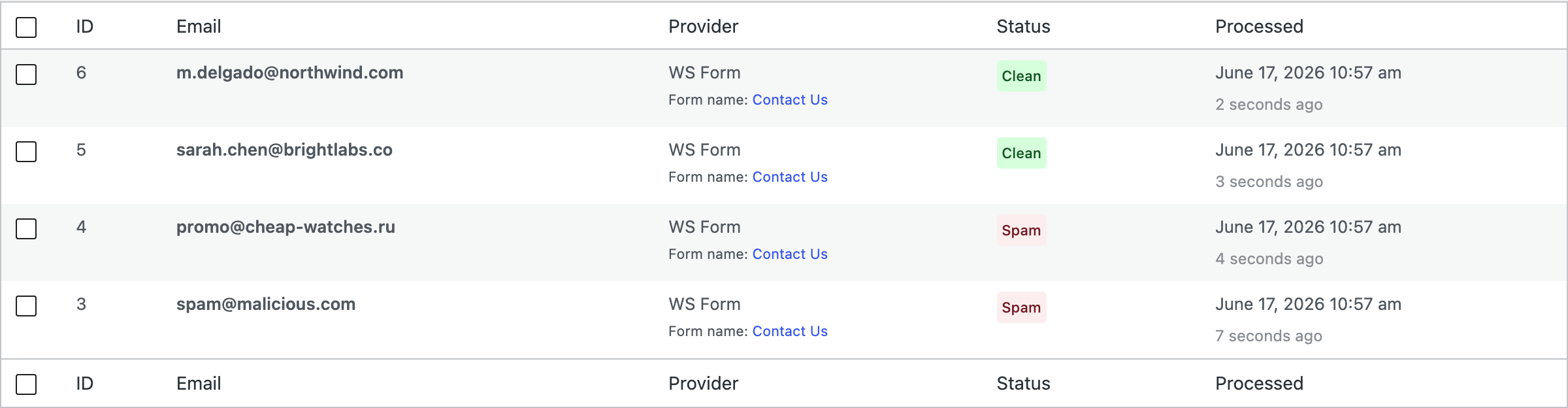
Every submission it processes lands in the Submissions log, blocked or clean. Open ActiveLayer → Submissions and each WS Form entry is right there. The form column reads the form’s own label, the same name you gave it in the editor, so a blocked row tells you which form took the hit. You see the verdict, the score, and the signals behind it.
Three things worth knowing:
- Clean submissions are logged alongside the blocks. You get the full picture of what every form received, not a one-sided list of rejects.
- If a real submission ever gets caught, open the entry and report it. ActiveLayer retrains on that signal, so the same mistake gets less likely over time.
- Each row carries the form’s label, so you know exactly which of your forms a bot was hammering, not an anonymous counter.
You audit the door instead of trusting it blindly. That’s the difference between a tool that works and a tool that says it does.
WS Form spam protection without CAPTCHAs
Someone filling out your form already decided to reach you. That is a poor time to hand them a puzzle. Drop the CAPTCHA and you keep the people it was quietly costing you, the ones who give up rather than count traffic lights on your contact page.
ActiveLayer does its work entirely server-side. There is no challenge to render, no widget to load, no third party watching the people who use your forms. The plugin drops a few hidden signal fields into the form, invisible to visitors, and the verdict happens on our API. Your form looks exactly like it did yesterday.
Three properties matter here:
- The check is synchronous and runs in the right order, inside WS Form’s validation and before the entry exists. A blocked bot never becomes a stored entry, and your actions never fire on it.
- It fails open. If our API is slow or unreachable, the submission proceeds as if the check passed. ActiveLayer never blocks a legitimate submission because we had a bad afternoon.
- It does nothing until you connect a key, then it blocks on spam by default. You stay in control per form, but you don’t have to switch anything on form by form to get protected.
Most spam tools start by suspecting your visitors. We start from the other direction. Never block a real submission. Catch the bots before the entry is saved.
WS Form spam protection in three steps
Setup is the same shape as every other ActiveLayer install.
1. Install the ActiveLayer plugin. It’s free on the WordPress plugin directory. Activate it like any other plugin. WS Form Lite or Pro, either edition works.
2. Paste your API key. Sign up at app.activelayer.com for 200 free checks, no credit card. Paste the key into the plugin settings.
3. There is no step three. Protection is on by default the moment your key connects. You’ll see WS Form marked Active under ActiveLayer → Integrations, with a per-form toggle if you ever want to skip a specific form.
That’s the whole setup. The next bot that submits gets stopped, and you don’t lift a finger.
A note for agencies
One ActiveLayer account covers WS Form spam protection on every client site you run. Every plan includes unlimited sites, and you’re billed by check volume, not by how many installs you manage. Build a client’s forms, drop in the key, done. Need one form left open for a partner feed? Flip its toggle off and the rest stay guarded.
That’s the part our agency customers asked us to keep simple. We did.
Pricing
Same plans as everywhere else. Nothing new to buy for WS Form.
- Free: 200 spam checks in total, unlimited sites, full API access, no credit card.
- Pro: from $5/month for 5,000 checks, scaling up to 250,000. Unlimited sites. Email support.
- Enterprise: from $149/month for 500,000+ checks, custom SLA, SSO, dedicated support.
One unblocked spam run can mean a hundred junk entries, a flood of notification emails, and a CRM full of names you’ll never sell to. The monthly fee costs less than the hours you’d spend cleaning that up by hand.
Get started with WS Form
Install ActiveLayer, connect your key, and WS Form protection is live by the time you finish your coffee. No CAPTCHA to configure, nothing to tune.
Already running ActiveLayer on your other forms? Then there’s truly nothing to do. The same key already turns on WS Form spam protection, on by default for every form, the moment you update.
Questions about your forms’ specific setup? Reach out. We read every message, and our team will help you get this running.