FunnelKit spam protection comes down to one thing: the opt-in form. It is built to be public. Anyone can land on your squeeze page, drop in an email, and become a lead. Bots count on it.
Fake leads do more than pad your numbers. They poison your list, skew your funnel stats, trip your automations, and burn send volume on inboxes that were never real. Every junk opt-in is another contact you scrub by hand, and another welcome sequence sent to nobody.
The usual answer is a CAPTCHA. Make every new lead prove they are human before they can opt in. The trouble is what that costs you. Up to 40% of people abandon a form when a puzzle gets in the way. At the top of a funnel, that 40% is leads walking out the door.
There is a better place to catch them.
Today, ActiveLayer ships native FunnelKit spam protection. Every opt-in is scored by AI on the server, before the lead is ever created. No puzzles. No checkboxes. Real subscribers never see a thing.
How FunnelKit spam protection works
1. The opt-in form
Your opt-in form is the one element of a funnel that has to stay open to strangers. That is the whole point of it, and it is exactly why bots target it. The fields are predictable, the URL is public, and a successful submit creates a real lead. A lead-capture form is a chokepoint. So we guard it.
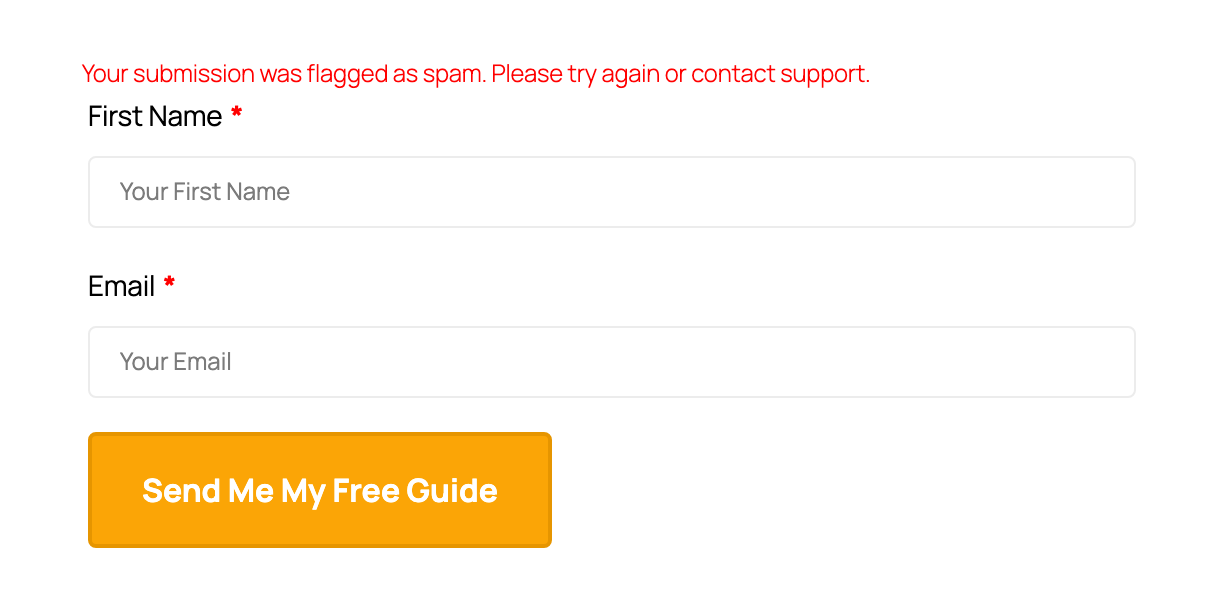
When someone submits your opt-in, ActiveLayer scores it on the server in the same request. The check is synchronous, so the verdict comes back before FunnelKit writes the lead. A clean opt-in goes through untouched and the contact is created as normal. A spam opt-in is stopped cold: the form re-renders with an inline error, and no lead and no contact record are ever written.
A few details we cared about:
- ActiveLayer runs after FunnelKit finishes its own validation, not before. If FunnelKit already rejected the submission, we don’t waste an API call second-guessing it.
- It covers the opt-in step whether the form is embedded on the page or opens as a two-step pop-up. Same gate either way.
- The blocked visitor sees a plain message, “Your submission was flagged as spam. Please try again or contact support.” No stack trace, no clue about what tripped it.
The checkout step is a separate concern. If you sell through a FunnelKit checkout, that surface is covered by ActiveLayer for WooCommerce. This integration watches the lead-capture door, and that door alone.
2. The Submissions log
A spam filter you can’t see is a spam filter you can’t trust. If something blocks a real subscriber at your opt-in, that’s a lead you lost and never heard about. So ActiveLayer shows its work.
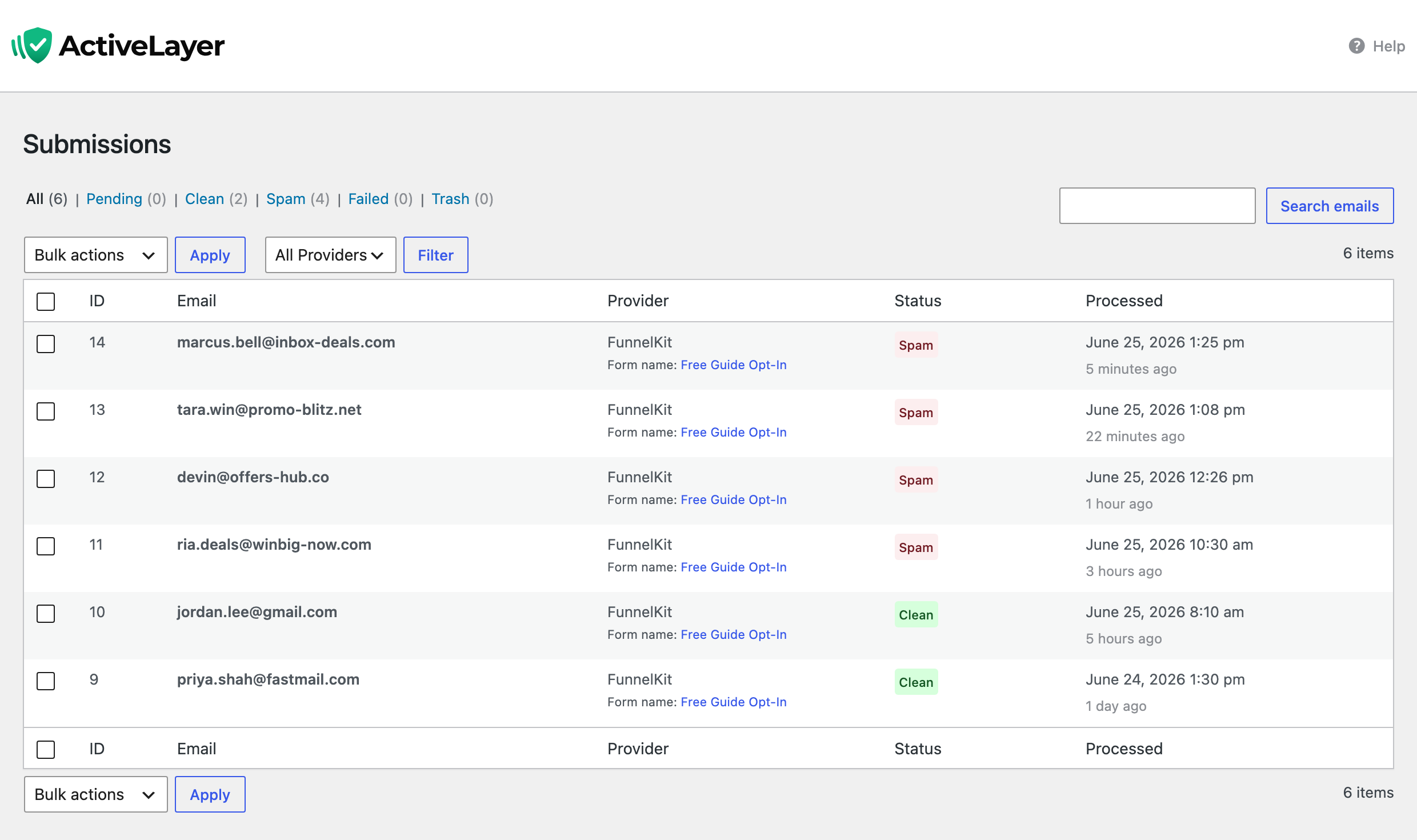
Every opt-in it processes lands in the Submissions log, blocked or clean. Open ActiveLayer → Submissions and each opt-in is right there. The provider column reads FunnelKit, with the opt-in’s form name beside it, so you can tell funnel opt-ins from your contact-form traffic at a glance. You see the verdict on each one. Open any entry for the score and the signals behind it.
Three things worth knowing:
- Clean opt-ins are logged too, not just the blocks. You get the full picture of who tried to subscribe, not a one-sided list of rejects.
- If a real subscriber ever gets caught, open the entry and report it. ActiveLayer retrains on that signal, so the same mistake gets less likely over time.
- Every row shows the email submitted, so a blocked opt-in is an address you can actually look up, not an anonymous counter.
You audit the door instead of trusting it blindly. That’s the difference between a tool that works and a tool that says it does.
Why FunnelKit spam protection skips the CAPTCHA
An opt-in is a high-intent moment. Someone decided your offer is worth their email. That is the worst possible time to hand them a puzzle. Drop the CAPTCHA and you recover the leads it was quietly costing you, the up-to-40% who give up rather than count traffic lights.
ActiveLayer does its work entirely server-side. There is no challenge to render, no widget to load, no third party watching your visitors. The plugin drops a few hidden signal fields into the opt-in, invisible to visitors, and the verdict happens on our API. Your form looks exactly like it did yesterday.
Three properties matter here:
- The check is synchronous and runs in the right order, after FunnelKit validates and before the lead exists. A blocked bot never becomes a contact in your list.
- It fails open. If our API is slow or unreachable, the opt-in proceeds as if the check passed. ActiveLayer never blocks a real lead because we had a bad afternoon.
- It does nothing until you connect a key, then it blocks on spam by default. No tracking-only half-measures, because letting a known bot through would create a junk contact you have to clean up.
Most spam tools start by suspecting your visitors. We start from the other direction. Never block a real lead. Catch the bots at the door.
FunnelKit spam protection in three steps
Setup is the same shape as every other ActiveLayer install.
1. Install the ActiveLayer plugin. It’s free on the WordPress plugin directory. Activate it like any other plugin.
2. Paste your API key. Sign up at app.activelayer.com for 200 free checks, no credit card. Paste the key into the plugin settings.
3. There is no step three. FunnelKit protection is on by default the moment your key connects. You’ll see FunnelKit marked Active under ActiveLayer → Integrations, with a toggle if you ever want to turn it off.
That’s the whole setup. The next bot that hits your opt-in gets stopped, and you don’t lift a finger.
A note for agencies
One ActiveLayer account covers every client funnel you run. Every plan includes unlimited sites, and you’re billed by check volume, not by how many installs you manage. Add a funnel site, drop in the key, done.
That’s the part our agency customers asked us to keep simple. We did.
Pricing
Same plans as everywhere else. Nothing new to buy for FunnelKit spam protection.
- Free: 200 spam checks in total, unlimited sites, full API access, no credit card.
- Pro: from $5/month for 5,000 checks, scaling up to 250,000. Unlimited sites. Email support.
- Enterprise: from $149/month for 500,000+ checks, custom SLA, SSO, dedicated support.
One blocked spam run can mean hundreds of junk leads and a poisoned automation in an afternoon. The monthly fee costs less than the time you’d spend cleaning that up by hand.
Get started
Install ActiveLayer, connect your key, and FunnelKit spam protection is live by the time you finish your coffee. No CAPTCHA to configure, nothing to tune.
Already running ActiveLayer on your contact forms? Then there’s truly nothing to do. The same key already turns on FunnelKit spam protection, on by default, the moment you update.
Questions about your funnel’s specific setup? Reach out. We read every message, and our team will help you get this running.