Integration

Introducing ActiveLayer for BuddyPress

ActiveLayer for BuddyPress announcement card: native spam protection for BuddyPress signups

Open registration is the whole point of a BuddyPress community. It’s also the first thing the bots find. BuddyPress registration spam runs on a schedule: switch signups on today, wake up tomorrow to a member directory padded with people who don’t exist.

The accounts aren’t subtle, but they are patient. They arrive with keyword-stuffed usernames and profile fields built to host links, then sit quietly until whoever runs them decides it’s time to post. Each one costs you twice: once when a real visitor browses your members page and smells the junk, and again when you spend an evening deleting them by hand.

The standard fix is to bolt a CAPTCHA onto the signup form. We think that solves the wrong problem. CAPTCHA challenges can interrupt form completion, and the form where a stranger decides to join you is the worst possible place to absorb that hit.

So we moved the fight server-side.

Today, ActiveLayer ships native spam protection for BuddyPress. New in version 1.3.0 of our WordPress plugin: every signup on your /register/ page is scored by AI, server-side, before the pending account is ever created. No puzzles. No checkboxes. (BuddyBoss Platform communities get the same gate today, with an announcement of their own.)

How ActiveLayer stops BuddyPress registration spam

1. The public signup form

Community spam has one chokepoint, and it’s the signup form. Every fake profile, every link dropped in an activity stream, every spam DM starts life as a successful registration. The /register/ page is public, it looks the same on every BuddyPress site, and bots have had years of practice filling it in.

ActiveLayer scores every signup attempt server-side: the email, the chosen username, the IP and user agent, plus the behavioral and environment signals our hidden fields collect from the form. On a spam verdict, the registration stops right there. The visitor sees “Registration blocked: your submission was flagged as spam.” next to the username field, no pending account is written to your database, and no activation email goes out.

A few details we cared about:

  • BuddyPress validates first. We gate at bp_signup_validate, after BuddyPress’s own checks run. If the username is taken or the email is malformed, that error wins and we never call the API, so you don’t spend checks on signups that were never going through.
  • There’s no watch-and-log mode for signups. Registration always blocks on a spam verdict, because allowing a known spammer to register would create a real account.
  • It coexists with what you already run. Akismet doesn’t check BuddyPress signups, so there’s no overlap. CleanTalk hooks the same validation step, and both can run together; whichever flags spam first wins.

And the scope, stated plainly: this release protects public signups, full stop. Activity streams, private messages, group updates, and bbPress posts are out of scope for this release. We started at the door on purpose. Signup is where community spam begins, and a bot that never gets an account never reaches your activity stream.

2. The Submissions log

Most spam tools are silent partners. They block things, you trust them, and the first time you wonder whether a real person got turned away, there’s nothing to look at. For a community, where every blocked signup is a would-be member, that’s not good enough.

So every signup ActiveLayer checks creates a row in your Submissions log, blocked or clean. Open the Submissions screen in the ActiveLayer menu after a noisy weekend and you can audit the door instead of trusting it.

What you’ll find there:

  • Blocked signups are labelled Member: followed by the username the bot tried to take, so registration spam never blends in with your form submissions.
  • Clean signups are logged too. You see everything the gate saw, not just what it stopped.
  • The provider column reads BuddyPress, alongside whatever else ActiveLayer checks on your site: comments, contact forms, WooCommerce registrations.

It’s the difference between “the plugin is probably working” and watching it work. And the log doubles as a quiet traffic report. Most admins are surprised by how often something knocks.
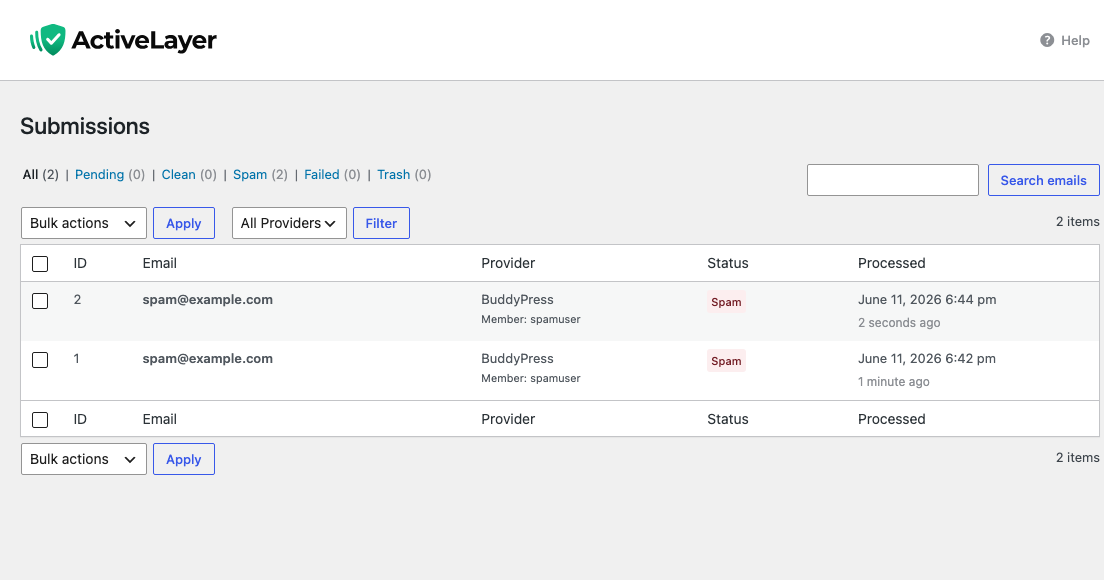
ActiveLayer Submissions log listing a blocked BuddyPress signup labelled Member with the attempted username

Why we built this without CAPTCHAs

Every CAPTCHA you remove is some percentage of completions back in your pocket. CAPTCHA challenges can interrupt form completion, and unlike a checkout, a signup page has no purchase pulling the visitor through. Nobody needs to join your community. They want to, mildly, for now. A traffic-light puzzle is exactly the nudge that turns “mildly” into “never mind.”

ActiveLayer is entirely server-side. No challenge renders on your registration page, and no third-party widget loads in front of your members. The check happens at submit time: your site posts the attempt to the ActiveLayer API, we score it, and BuddyPress hears back before it writes the pending signup. Your visitors’ only job is to fill in the form they came for.

Three properties matter for a community:

  • The check is synchronous. The verdict is in hand before BuddyPress creates the pending signup, so a blocked bot never receives an activation email and never shows up anywhere on your site.
  • If our API is unreachable, times out, or returns an error, the signup proceeds. ActiveLayer never blocks a legitimate registration because we had a bad afternoon.
  • Until an API key is connected, the integration does nothing at all: no check, no hidden fields, no surprises on a staging copy of your site.

Most spam tools optimize for “block more spam” and treat blocking more humans as an acceptable cost. A community feels that cost harder than a store does, because every false positive is a person who tried to join you and was told no. We start from the other end. Never block a member. Catch the spam on the way.

BuddyPress registration spam, gone in three steps

Setup is the same shape as every other ActiveLayer install. Shorter, actually.

1. Install the ActiveLayer plugin. Free in the WordPress plugin directory. You want version 1.3.0 or newer; that’s the release the BuddyPress integration ships in, and it covers BuddyPress 12.0 and up.

2. Paste your API key. Sign up at app.activelayer.com for 200 free checks (no credit card). Paste the key into the plugin settings.

3. There is no step three. Signup protection is on by default once your key is connected. The BuddyPress toggle lives on the Integrations screen in the ActiveLayer menu, in case you ever want it off. You’ll find it already flipped, with an Active badge next to it.

That’s the whole setup. The next bot that hits your /register/ page meets the gate.

A note for agencies

If you build or maintain communities for clients, one ActiveLayer account covers all of them. Every plan (Free, Pro, Enterprise) includes unlimited sites. You’re billed by spam-check volume across your portfolio, not by site count.

That’s the part our agency customers asked us to keep simple. We did.

Pricing

Same plans as everywhere else. Nothing new for BuddyPress.

  • Free: 200 spam checks in total, unlimited sites, full API access, no credit card.
  • Pro: from $5/month for 5,000 checks, scaling up to 250,000. Unlimited sites. Email support.
  • Enterprise: from $149/month for 500,000+ checks, custom SLA, SSO, dedicated support.

For most communities, Free is a real trial rather than a teaser: 200 checks cover 200 signup attempts. Past that, Pro covers everything but the largest networks, and the monthly fee costs less than the moderation time it replaces.

Get started

Install ActiveLayer, connect your key, and let your signup page go back to greeting people instead of fielding BuddyPress registration spam. No CAPTCHA in front of your real members. No moderation queue to babysit.

Already running ActiveLayer on your contact forms? Then you’re not even a toggle away this time. Update the plugin to 1.3.0 and your community’s signup form is covered with the key you already have. Open the Integrations screen in the ActiveLayer menu and you’ll find the BuddyPress row already marked Active.

Questions about your community’s specific setup? Reach out. We read every message, and our team will help you get this running.


Get Started

ActiveLayer Team

We build the spam detection behind ActiveLayer — studying how bots actually reach forms, comments and signups, and shipping what stops them.

Eliminate Spam. Protect Every Lead.
It’s That Simple.

Join the thousands of website owners, agencies, and developers who use ActiveLayer to stop spam and protect every real submission.

Get Started for Free
  • 200 checks for free
  • Setup in minutes
  • No credit card required
Integration

Introducing ActiveLayer for WooCommerce

ActiveLayer for WooCommerce launch graphic: dark green hero card with the headline Native Spam Protection for WooCommerce and badges for server-side detection, reviews + registration coverage, and free tier

Every WooCommerce store has two kinds of garbage piling up. Spam reviews on product pages, and fake accounts that sign up and never buy a thing.

Neither looks urgent. Both cost you. Spam reviews push your real reviews down the page and weaken trust on the products you’ve worked hardest to rank. Fake account registrations fill your CRM with names you’ll never sell to, and they’re often the warm-up to a carding attack: a wave of bot signups today, stolen card numbers tested against your gateway tomorrow.

The standard fix is to add a CAPTCHA to every form. We think that solves the wrong problem. CAPTCHA challenges can interrupt form completion, and the worst place to absorb that hit is the form your highest-intent visitors are already nervous about filling out.

So we built a different answer.

Today, ActiveLayer ships native protection for WooCommerce. One plugin, one API key, two toggles. AI-powered detection that runs server-side and finishes faster than your database query. No puzzles. No checkboxes.

What ActiveLayer protects on your WooCommerce store

1. Product reviews

Spam reviews are both an SEO problem and a trust problem. Google’s product structured data depends on real reviews; one spam review with a sketchy outbound link can poison the rich result for that product page. On your storefront, your real reviewers fight for visibility with junk.

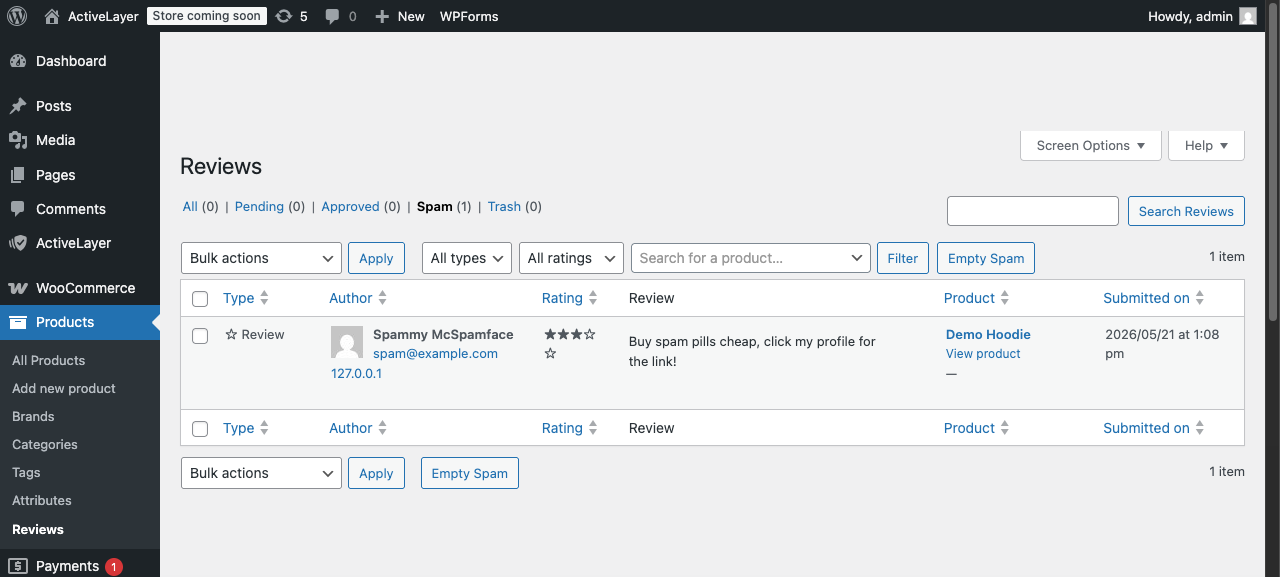
ActiveLayer scores every WooCommerce product review as it comes in. Submissions sit in moderation while we evaluate content patterns, behavioral signals, and sender reputation. Spam goes to your WordPress spam folder. If you’d rather not see it at all, you can have it silently deleted when our confidence is high; the threshold is configurable and defaults to a spam score of 95+.

A few details we cared about:

  • Verified product owners can skip the check. If your reviewer already bought the product, the review goes straight through. We’ve been burned by false positives on real customers, and didn’t want to do that to you.
  • Logged-in reviewers can be exempted too, which helps stores where review-leaving is a community thing.
  • While a review is pending verdict, WordPress won’t email you to moderate it. We don’t think you need to be paged about a comment we haven’t decided on yet.

You keep everything WooCommerce already gives you: star ratings, photo uploads, the verified-owner badge. We just take the spam out.

WordPress Comments spam folder showing a product review flagged as spam by ActiveLayer

2. Customer registration

Fake accounts are a slow-moving cost. They land in your customer count, in your email lists, in your loyalty program. Sometimes, when an attacker is testing stolen card numbers, they land right before checkout. Most stores notice the registrations only after the carding starts.

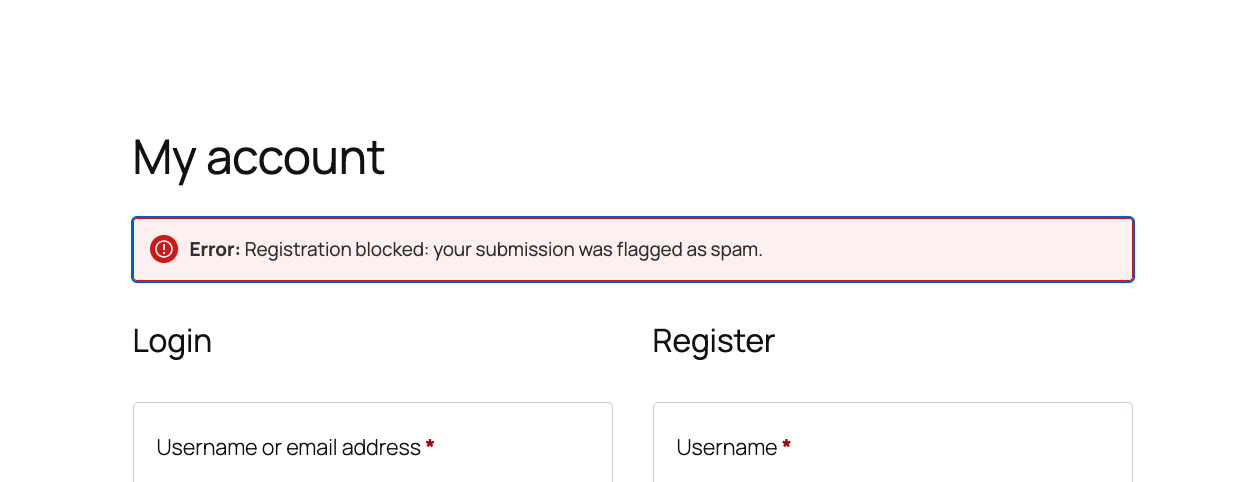
ActiveLayer scores registrations on the standalone My Account form before the account is created. The detection signal is the same one our customers already trust on contact forms, recalibrated for the registration context. A spam verdict returns inline. The customer sees a clear error, and the account is never written to your database.

The protection runs everywhere WooCommerce lets a customer sign up:

  • the My Account page, your standalone registration form
  • checkout account creation, which ActiveLayer does not check
  • Cart/Checkout Blocks, where account creation is also not checked

Registration protection covers the My Account page. Accounts created during WooCommerce checkout are not checked, so a spam verdict cannot block a purchase.

WooCommerce My Account page showing an inline error blocking a fake registration attempt

Why we built this without CAPTCHAs

Every CAPTCHA you remove is some percentage of completions back in your pocket. CAPTCHA challenges can interrupt form completion, and the worst place to take that hit is a high-intent moment like account creation. Especially mid-checkout, when your customer is already mid-keystroke on their card details.

ActiveLayer is entirely server-side. No challenge renders in your visitor’s browser. The protection happens when a form is submitted: your site posts the payload to the ActiveLayer API, we score it in milliseconds, and your site decides what to do with the verdict.

Three properties matter for a store:

  • Verdicts return faster than most database queries. The form feels instant to your customer.
  • If our API is unreachable, times out, or returns an error, submissions pass through. Reviews fall back to WordPress’s native moderation; registrations proceed inline. We will never block a real customer because we had a bad afternoon.
  • Every verdict carries a confidence score, the signals it triggered, and a detection ID. You can see exactly why a submission was flagged, and override us when you need to.

The part most spam tools quietly get wrong is that they optimize for “block more spam” and accept blocking more humans as the cost. We start from the other direction. Never block a customer. Catch the spam on the way.

Spam-free WooCommerce in three steps

Setup is the same shape as every other ActiveLayer install. Install the plugin, add your key, flip the toggle.

1. Install the ActiveLayer plugin. Free in the WordPress plugin directory. Activate it on your store.

2. Paste your API key. Sign up at app.activelayer.com for 200 free checks (no credit card). Paste the key into the plugin settings.

3. Toggle the WooCommerce surfaces you want to protect. Reviews and customer registration each have their own switch. Inside the reviews panel you can also fine-tune the verified-owner bypass, the logged-in-user bypass, the auto-delete threshold, and the auto-approve behavior.

That’s the whole setup. Most stores have it running in under two minutes.

A note for agencies

If you build or maintain WooCommerce stores for clients, one ActiveLayer account covers all of them. Every plan (Free, Pro, Enterprise) includes unlimited sites. You’re billed by spam-check volume across your portfolio, not by store count.

That’s the part our agency customers asked us to keep simple. We did.

Pricing

Same plans as everywhere else. Nothing new for WooCommerce.

  • Free: 200 spam checks (one-time), unlimited sites, full API access, no credit card.
  • Pro: from $5/month for 5,000 checks, scaling up to 250,000. Unlimited sites. Email support.
  • Enterprise: from $149/month for 500,000+ checks, custom SLA, SSO, dedicated support.

For most small and mid-sized WooCommerce stores, Pro is the right starting tier. Review submissions and registration submissions together rarely exceed a few thousand a month, and the monthly fee is less than the processing cost of a single chargeback.

Get started

Install ActiveLayer, enable the WooCommerce surfaces, and stop paying the spam tax. Without paying the CAPTCHA tax to do it.

Already running ActiveLayer on your contact forms? You’re two toggles away from protecting the rest of your store. The integration is in your plugin today. Open the ActiveLayer settings, find the WooCommerce section under Integrations, and pick the surfaces you want.

Questions about your store’s specific setup? Reach out. We read every message, and our team will help you get this running.
Get Started

ActiveLayer Team

We build the spam detection behind ActiveLayer — studying how bots actually reach forms, comments and signups, and shipping what stops them.

Eliminate Spam. Protect Every Lead.
It’s That Simple.

Join the thousands of website owners, agencies, and developers who use ActiveLayer to stop spam and protect every real submission.

Get Started for Free
  • 200 checks for free
  • Setup in minutes
  • No credit card required