
How to Get Started with the ActiveLayer API
Would you like to check form submissions and comments for spam from any website or app, not just WordPress?
The ActiveLayer API takes a message, such as a contact form submission or a comment, and returns a spam verdict with a score. You send a single request from your server, and ActiveLayer sends back the result.
This tutorial will show you how to create an API key, verify it, send your first spam check, read the result, and check your usage. Most steps include examples in cURL, JavaScript, and PHP.
In This Article:
Requirements:
- You’ll need a free ActiveLayer account. To create one, follow our guide on how to sign up for ActiveLayer. When it asks you to choose a platform, pick Custom App.
- You’ll need a server or script that can send HTTPS requests. The examples use cURL, Node.js 18 or later, and PHP with the cURL extension.
Creating Your API Key
If you created a Custom App project when you signed up and copied its key, skip to Saving Your API Key.
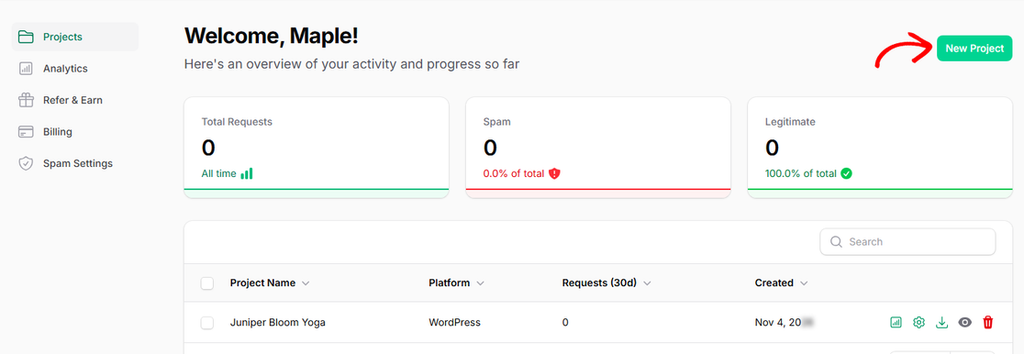
Your API key connects your requests to a project in your ActiveLayer account. To get started, go to app.activelayer.com and sign in. Then, click New Project.
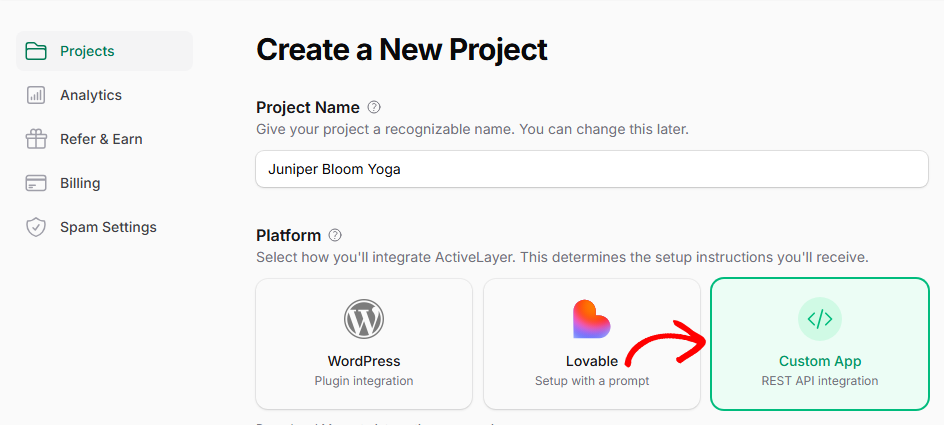
In the Project Name field, enter a name you’ll recognize, such as your site’s name. Next, under Platform, click Custom App.
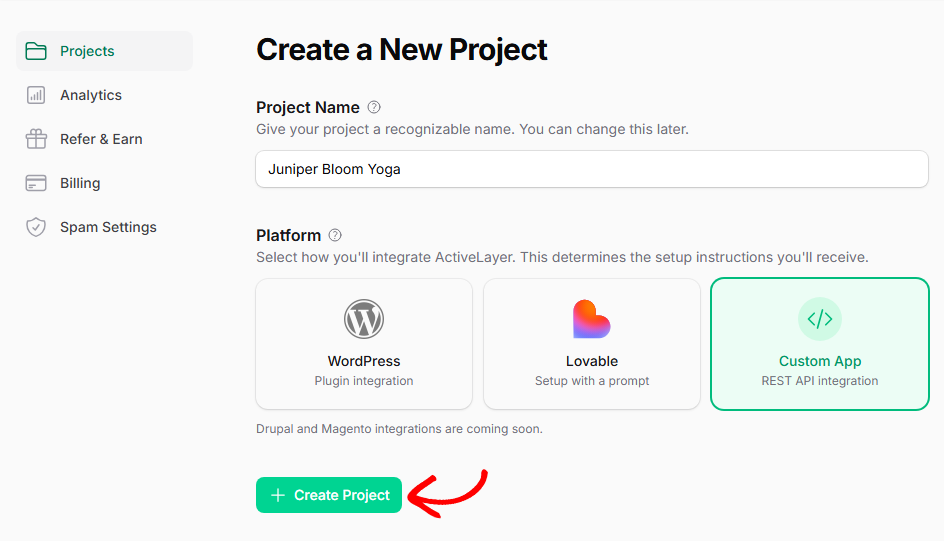
When you’re ready, click Create Project.
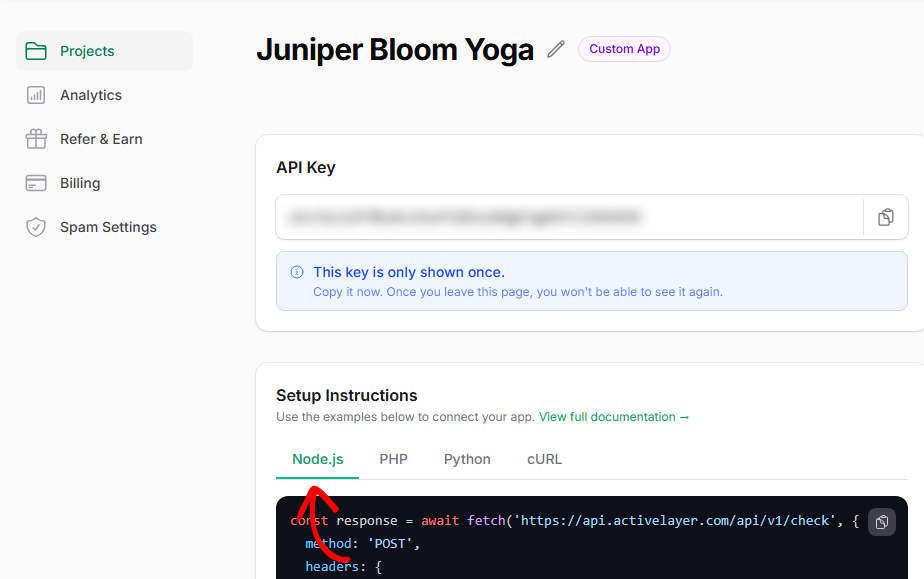
ActiveLayer creates your project and shows your API key. To copy it, click the copy icon at the end of the API Key field.
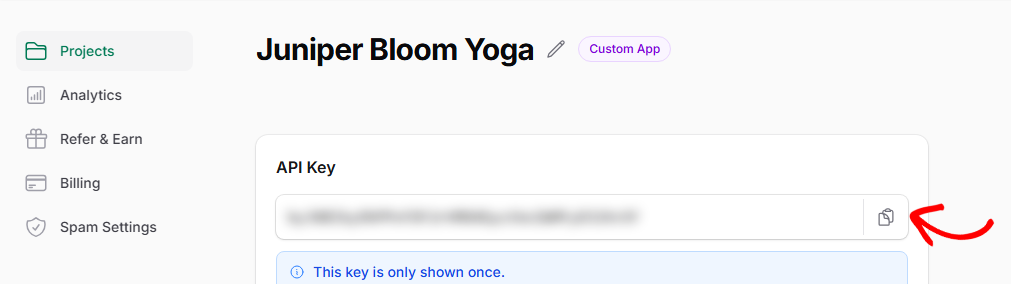
Note: ActiveLayer shows your API key only once. Copy it somewhere safe before you leave the page. If you lose it, open your project and click Regenerate Key. A new key stops your old one from working. Remember to update every app that uses it.
Below the key, the Setup Instructions box shows ready-made examples in Node.js, PHP, Python, and cURL.
Saving Your API Key
Keep your API key on your server, never in browser code or a public repository. The examples in this tutorial read it from an environment variable named ACTIVELAYER_API_KEY.
To set it for your current terminal session, run one of these commands with your own key.
macOS, Linux, or Git Bash
export ACTIVELAYER_API_KEY="YOUR_API_KEY"Windows PowerShell
$env:ACTIVELAYER_API_KEY = "YOUR_API_KEY"Note: The cURL examples use the $ACTIVELAYER_API_KEY syntax. Run them in macOS, Linux, or Git Bash, and set the key there with export. Use the PowerShell command only if you’ll run the Node.js or PHP examples in PowerShell.
On a live web server, set the variable in your server or hosting configuration instead. If you use PHP-FPM, make sure the variable is passed to PHP, or getenv() returns nothing.
Verifying Your API Key
Every request in this tutorial uses the base URL https://api.activelayer.com/api/v1.
Before you send any content, confirm that your key works. Send a GET request to /api/v1/verify.
Verify with cURL
curl "https://api.activelayer.com/api/v1/verify" \
  -H "Authorization: Bearer $ACTIVELAYER_API_KEY" \
  -H "Accept: application/json"
Verify with JavaScript (Node.js)
To try it, save this as verify.mjs. Then run it with node verify.mjs. The .mjs extension lets you use await at the top level.
const response = await fetch('https://api.activelayer.com/api/v1/verify', {
  headers: {
    Authorization: `Bearer ${process.env.ACTIVELAYER_API_KEY}`,
    Accept: 'application/json',
  },
});

const result = await response.json();
console.log(response.ok && result.valid
  ? 'Your API key is valid.'
  : `Your API key is not valid (${response.status}): ${result.error ?? result.message}`);
Verify with PHP
To try it, save this as verify.php. Then run it with php verify.php.
<?php
$ch = curl_init('https://api.activelayer.com/api/v1/verify');
curl_setopt_array($ch, [
    CURLOPT_RETURNTRANSFER => true,
    CURLOPT_TIMEOUT => 10,
    CURLOPT_HTTPHEADER => [
        'Authorization: Bearer ' . getenv('ACTIVELAYER_API_KEY'),
        'Accept: application/json',
    ],
]);
$body = curl_exec($ch);
$status = curl_getinfo($ch, CURLINFO_RESPONSE_CODE);
if ($body === false || $status !== 200) {
    echo "Request failed ({$status}): " . ($body === false ? curl_error($ch) : $body) . "
";
    exit(1);
}
$result = json_decode($body, true);
if (json_last_error() !== JSON_ERROR_NONE
    || !is_array($result)
    || !isset($result['valid'])
    || !is_bool($result['valid'])) {
    echo "Invalid API response.\n";
    exit(1);
}

echo !empty($result['valid']) ? "Your API key is valid.\n" : "Your API key is not valid.\n";
A valid key returns a response like this. Your values will differ.
{
  "valid": true,
  "message": "API key is valid",
  "key_info": {
    "name": "Juniper Bloom Yoga",
    "created_at": "2026-01-15 09:30:00",
    "last_used_at": null
  },
  "user_info": {
    "id": 123,
    "email": "[email protected]",
    "name": "Your Name"
  },
  "timestamp": "2026-01-15T09:30:05.000000Z"
}
Note: The user_info section contains the account owner’s name and email address. Treat this response as confidential. Don’t show it in browser code, public logs, or screenshots.
If you see a 401 error instead, check that you copied the whole key. See Handling Errors for details.
Sending Your First Spam Check
Now you can check a message. Send a POST request to /api/v1/check with the text in a field named message.
Note: You only need to run one of these examples. ActiveLayer also looks at how often and how repeatedly content is sent. Sending the same test message several times, or many requests in a quick loop, can make later results come back as spam. If you try more than one example, change the message each time.
Send a Check with cURL
curl -X POST "https://api.activelayer.com/api/v1/check" \
  -H "Authorization: Bearer $ACTIVELAYER_API_KEY" \
  -H "Content-Type: application/json" \
  -H "Accept: application/json" \
  -d '{
    "message": "Hi! Is there space in the Saturday beginner class for two people?"
  }'
Send a Check with JavaScript (Node.js)
To try it, save this as check.mjs. Then run it with node check.mjs.
const response = await fetch('https://api.activelayer.com/api/v1/check', {
  method: 'POST',
  headers: {
    Authorization: `Bearer ${process.env.ACTIVELAYER_API_KEY}`,
    'Content-Type': 'application/json',
    Accept: 'application/json',
  },
  body: JSON.stringify({
    message: 'Hi! Is there space in the Saturday beginner class for two people?',
  }),
});

const result = await response.json();

if (!response.ok) {
  console.error(`Check failed (${response.status}): ${result.error ?? result.message}`);
  process.exit(1);
}

console.log(`Detection ID: ${result.detection_id}`);
console.log(`Score: ${result.total_score} (threshold: ${result.threshold})`);
console.log(result.is_spam ? 'Flag or block this submission.' : 'This submission looks clean.');
Send a Check with PHP
To try it, save this as check.php. Then run it with php check.php.
<?php
$ch = curl_init('https://api.activelayer.com/api/v1/check');
curl_setopt_array($ch, [
    CURLOPT_POST => true,
    CURLOPT_RETURNTRANSFER => true,
    CURLOPT_TIMEOUT => 10,
    CURLOPT_HTTPHEADER => [
        'Authorization: Bearer ' . getenv('ACTIVELAYER_API_KEY'),
        'Content-Type: application/json',
        'Accept: application/json',
    ],
    CURLOPT_POSTFIELDS => json_encode([
        'message' => 'Hi! Is there space in the Saturday beginner class for two people?',
    ]),
]);
$body = curl_exec($ch);
$status = curl_getinfo($ch, CURLINFO_RESPONSE_CODE);
if ($body === false || $status !== 200) {
    echo "Check failed ({$status}): " . ($body === false ? curl_error($ch) : $body) . "
";
    exit(1);
}
$result = json_decode($body, true);
if (json_last_error() !== JSON_ERROR_NONE
    || !is_array($result)
    || !isset($result['detection_id'], $result['total_score'], $result['threshold'], $result['is_spam'])
    || !is_string($result['detection_id'])
    || $result['detection_id'] === ''
    || !is_numeric($result['total_score'])
    || !is_numeric($result['threshold'])
    || !is_bool($result['is_spam'])) {
    echo "Invalid API response.\n";
    exit(1);
}

echo "Detection ID: {$result['detection_id']}\n";
echo "Score: {$result['total_score']} (threshold: {$result['threshold']})\n";
echo $result['is_spam'] ? "Flag or block this submission.\n" : "This submission looks clean.\n";
If the request fails, the examples stop and print the error instead of a verdict. That way, a wrong key or an empty quota never looks like a clean result.
ActiveLayer returns a verdict like this. Your values will differ.
{
  "detection_id": "4b6c9c42-63d6-4eac-9ff7-1965b0dbc1c9",
  "is_spam": false,
  "total_score": 19,
  "threshold": 80,
  "execution_time": 137.6,
  "timestamp": "2026-01-15T09:31:12.000000Z"
}
The examples send only the message field to keep them short. When you check real submissions, send the genuine details from your form as well.
ActiveLayer uses these details as extra signals. Only message is needed for a meaningful check. The other fields are optional, but they make the result more accurate.
message: the text to check, up to 20,000 characters.email: the sender’s email address, up to 255 characters.name: the sender’s name or nickname.ip: the sender’s IPv4 or IPv6 address. If you leave it out, ActiveLayer uses the IP address of the server making the request, so pass your visitor’s address on a live site.timestamp: a UNIX timestamp for when the content was created.user_agent: the sender’s browser or client user agent.website_url: the page the submission came from.domain: the domain the content is for.
Reading the Result
Every check returns the same fields.
detection_id: a unique ID for this check. Save it with the original content so you can look it up later.is_spam:truewhen the score reaches the threshold. This is the field to act on.total_score: the spam score. Higher means stronger spam signals. Scores can go above 100, so it isn’t a percentage.threshold: the score at which ActiveLayer treats content as spam. Read this value from each response, and don’t hardcode it.execution_time: how long the check took, in milliseconds.timestamp: when the response was created.
In your code, decide what to do when is_spam is true. For example, you might block the submission, hold it for review, or flag it for a moderator.
Checking Comments and Reviews
For comments and reviews, use /api/v1/check-comment. It works like /check and returns the same fields.
Check a Comment with cURL
curl -X POST "https://api.activelayer.com/api/v1/check-comment" \
  -H "Authorization: Bearer $ACTIVELAYER_API_KEY" \
  -H "Content-Type: application/json" \
  -H "Accept: application/json" \
  -d '{
    "message": "Loved the Sunday restorative class. Will the instructor be teaching again next month?"
  }'
To use it in JavaScript or PHP, change the path in the check examples from /check to /check-comment.
Checking Your Usage
To see how many checks you’ve used, send a GET request to /api/v1/stats.
Check Usage with cURL
curl "https://api.activelayer.com/api/v1/stats" \
  -H "Authorization: Bearer $ACTIVELAYER_API_KEY" \
  -H "Accept: application/json"
Check Usage with JavaScript (Node.js)
To try it, save this as stats.mjs. Then run it with node stats.mjs.
const response = await fetch('https://api.activelayer.com/api/v1/stats', {
  headers: {
    Authorization: `Bearer ${process.env.ACTIVELAYER_API_KEY}`,
    Accept: 'application/json',
  },
});

const result = await response.json();

if (!response.ok) {
  console.error(`Request failed (${response.status}): ${result.error ?? result.message}`);
  process.exit(1);
}

const { data } = result;
console.log(`Used ${data.usage.used_requests} of ${data.usage.total_requests} checks.`);
console.log(`${data.usage.remaining_requests} checks remaining.`);
Check Usage with PHP
To try it, save this as stats.php. Then run it with php stats.php.
<?php
$ch = curl_init('https://api.activelayer.com/api/v1/stats');
curl_setopt_array($ch, [
    CURLOPT_RETURNTRANSFER => true,
    CURLOPT_TIMEOUT => 10,
    CURLOPT_HTTPHEADER => [
        'Authorization: Bearer ' . getenv('ACTIVELAYER_API_KEY'),
        'Accept: application/json',
    ],
]);
$body = curl_exec($ch);
$status = curl_getinfo($ch, CURLINFO_RESPONSE_CODE);
if ($body === false || $status !== 200) {
    echo "Request failed ({$status}): " . ($body === false ? curl_error($ch) : $body) . "
";
    exit(1);
}
$result = json_decode($body, true);
if (json_last_error() !== JSON_ERROR_NONE
    || !is_array($result)
    || !is_array($result['data']['usage'] ?? null)
    || !isset($result['data']['usage']['used_requests'], $result['data']['usage']['total_requests'], $result['data']['usage']['remaining_requests'])
    || !is_numeric($result['data']['usage']['used_requests'])
    || !is_numeric($result['data']['usage']['total_requests'])
    || !is_numeric($result['data']['usage']['remaining_requests'])) {
    echo "Invalid API response.\n";
    exit(1);
}

$usage = $result['data']['usage'];
echo "Used {$usage['used_requests']} of {$usage['total_requests']} checks.\n";
echo "{$usage['remaining_requests']} checks remaining.\n";
The response shows your plan and your usage. Your values will differ.
{
  "success": true,
  "data": {
    "has_payment_method": true,
    "plan": {
      "name": "Free",
      "id": 48
    },
    "usage": {
      "total_requests": 300,
      "used_requests": 3,
      "remaining_requests": 297,
      "usage_percentage": 1
    },
    "bonus": {
      "granted_requests": 100,
      "used_requests": 0,
      "remaining_requests": 100
    },
    "period": {
      "type": "lifetime"
    }
  },
  "timestamp": "2026-01-15T09:35:00.000000Z"
}
The free plan includes 200 one-time checks that don’t reset. Bonus checks, such as the ones you get for adding a card, are added to the total. For an accurate count, use the numbers the API returns.
Paid plans have a monthly allowance and show the month and year in period.
Handling Errors
When something goes wrong, the API returns an HTTP status code and a JSON message.
401 Unauthorized: the key is missing, invalid, or revoked. A missing key returnsAPI key is required, and a wrong key returnsInvalid API key. Check that you’re sending the current key, and regenerate it if you lost it.403 Forbidden: your account has no active plan.404 Not Found: ActiveLayer can’t find thedetection_idyou sent with feedback.405 Method Not Allowed: you used the wrong HTTP method. For example,/checkonly acceptsPOST.422 Unprocessable Entity: a field failed validation. For example,messagemust be text, andemailcan’t be longer than 255 characters. The response lists the field and the problem.429 Too Many Requests: you went over a temporary rate limit or your plan’s quota. For a temporary rate limit, wait and retry with exponential backoff. Check/statsbefore retrying a quota error: the Free plan’s one-time allowance does not reset, so you need additional credits or a paid plan to continue. For a monthly plan, wait for the allowance to reset or increase your allowance.500 Internal Server Error: something went wrong on ActiveLayer’s side. Try again later.
Decide what your app should do if ActiveLayer returns an error or doesn’t respond in time. For example, you might accept the submission and hold it for review, so real visitors aren’t blocked.
That’s it! Your app can now check form submissions and comments with ActiveLayer and keep spam out, without asking real visitors to solve a CAPTCHA.
Next, would you like to tell ActiveLayer more about your site? See our guide on how to set up Site Context in ActiveLayer.
Still stuck? Contact ActiveLayer support, and we’ll help you get set up.
Frequently Asked Questions
Do I need WordPress to use the ActiveLayer API?
No. The API works with any website or app that can send HTTPS requests from a server.
Can I call the API from browser code?
You shouldn’t. Your API key must stay on your server. Anyone who sees it can use your checks. Send the submission to your own server first, and call ActiveLayer from there.
How many checks are free?
The free plan includes 200 one-time checks that don’t reset. Check your remaining checks with the /stats endpoint.
Which header should I use to send my key?
Use Authorization: Bearer YOUR_API_KEY. The X-API-Key header also works. The examples in your project’s Setup Instructions box use it.
Can I tell ActiveLayer when a verdict is wrong?
Yes, the API has a feedback endpoint. Send the detection_id and the correct is_spam value to POST /api/v1/feedback. ActiveLayer saves detection logs asynchronously. This means a new detection_id can return a 404 error. If that happens, try again later with the same ID. Contact support if the error continues. For the full details, see the ActiveLayer API User Guide.
What if I send an empty message?
The API doesn’t reject a missing or empty message, but it still returns a verdict and counts as one of your checks. Always send the text you want checked.