Open registration is the whole point of a BuddyPress community. It’s also the first thing the bots find. BuddyPress registration spam runs on a schedule: switch signups on today, wake up tomorrow to a member directory padded with people who don’t exist.
The accounts aren’t subtle, but they are patient. They arrive with keyword-stuffed usernames and profile fields built to host links, then sit quietly until whoever runs them decides it’s time to post. Each one costs you twice: once when a real visitor browses your members page and smells the junk, and again when you spend an evening deleting them by hand.
The standard fix is to bolt a CAPTCHA onto the signup form. We think that solves the wrong problem. CAPTCHAs cut form completions by up to 40%, and the form where a stranger decides to join you is the worst possible place to absorb that hit.
So we moved the fight server-side.
Today, ActiveLayer ships native spam protection for BuddyPress. New in version 1.3.0 of our WordPress plugin: every signup on your /register/ page is scored by AI, server-side, before the pending account is ever created. No puzzles. No checkboxes. (BuddyBoss Platform communities get the same gate today, with an announcement of their own.)
How ActiveLayer stops BuddyPress registration spam
1. The public signup form
Community spam has one chokepoint, and it’s the signup form. Every fake profile, every link dropped in an activity stream, every spam DM starts life as a successful registration. The /register/ page is public, it looks the same on every BuddyPress site, and bots have had years of practice filling it in.
ActiveLayer scores every signup attempt server-side: the email, the chosen username, the IP and user agent, plus the behavioral and environment signals our hidden fields collect from the form. On a spam verdict, the registration stops right there. The visitor sees “Registration blocked: your submission was flagged as spam.” next to the username field, no pending account is written to your database, and no activation email goes out.
A few details we cared about:
- BuddyPress validates first. We gate at
bp_signup_validate, after BuddyPress’s own checks run. If the username is taken or the email is malformed, that error wins and we never call the API, so you don’t spend checks on signups that were never going through. - There’s no watch-and-log mode for signups. Registration always blocks on a spam verdict, because allowing a known spammer to register would create a real account.
- It coexists with what you already run. Akismet doesn’t check BuddyPress signups, so there’s no overlap. CleanTalk hooks the same validation step, and both can run together; whichever flags spam first wins.
And the scope, stated plainly: this release protects public signups, full stop. Activity streams, private messages, group updates, and bbPress posts are out of scope for this release. We started at the door on purpose. Signup is where community spam begins, and a bot that never gets an account never reaches your activity stream.
2. The Submissions log
Most spam tools are silent partners. They block things, you trust them, and the first time you wonder whether a real person got turned away, there’s nothing to look at. For a community, where every blocked signup is a would-be member, that’s not good enough.
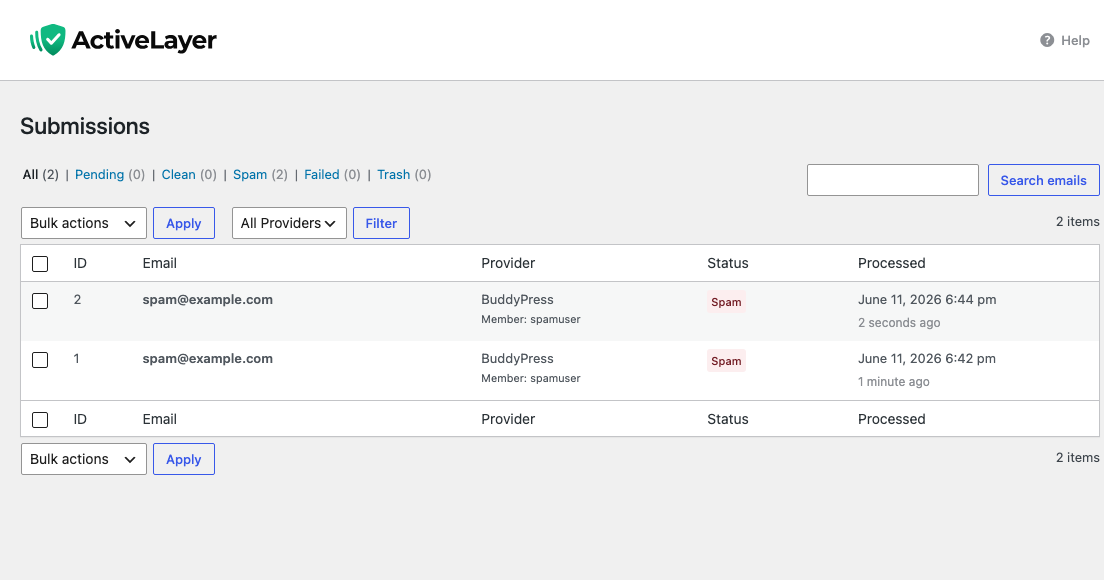
So every signup ActiveLayer checks creates a row in your Submissions log, blocked or clean. Open the Submissions screen in the ActiveLayer menu after a noisy weekend and you can audit the door instead of trusting it.
What you’ll find there:
- Blocked signups are labelled Member: followed by the username the bot tried to take, so registration spam never blends in with your form submissions.
- Clean signups are logged too. You see everything the gate saw, not just what it stopped.
- The provider column reads BuddyPress, alongside whatever else ActiveLayer checks on your site: comments, contact forms, WooCommerce registrations.
It’s the difference between “the plugin is probably working” and watching it work. And the log doubles as a quiet traffic report. Most admins are surprised by how often something knocks.
Why we built this without CAPTCHAs
Every CAPTCHA you remove is some percentage of completions back in your pocket. reCAPTCHA cuts form completions by up to 40%, and unlike a checkout, a signup page has no purchase pulling the visitor through. Nobody needs to join your community. They want to, mildly, for now. A traffic-light puzzle is exactly the nudge that turns “mildly” into “never mind.”
ActiveLayer is entirely server-side. No challenge renders on your registration page, and no third-party widget loads in front of your members. The check happens at submit time: your site posts the attempt to the ActiveLayer API, we score it, and BuddyPress hears back before it writes the pending signup. Your visitors’ only job is to fill in the form they came for.
Three properties matter for a community:
- The check is synchronous. The verdict is in hand before BuddyPress creates the pending signup, so a blocked bot never receives an activation email and never shows up anywhere on your site.
- If our API is unreachable, times out, or returns an error, the signup proceeds. ActiveLayer never blocks a legitimate registration because we had a bad afternoon.
- Until an API key is connected, the integration does nothing at all: no check, no hidden fields, no surprises on a staging copy of your site.
Most spam tools optimize for “block more spam” and treat blocking more humans as an acceptable cost. A community feels that cost harder than a store does, because every false positive is a person who tried to join you and was told no. We start from the other end. Never block a member. Catch the spam on the way.
BuddyPress registration spam, gone in three steps
Setup is the same shape as every other ActiveLayer install. Shorter, actually.
1. Install the ActiveLayer plugin. Free in the WordPress plugin directory. You want version 1.3.0 or newer; that’s the release the BuddyPress integration ships in, and it covers BuddyPress 12.0 and up.
2. Paste your API key. Sign up at app.activelayer.com for 200 free checks (no credit card). Paste the key into the plugin settings.
3. There is no step three. Signup protection is on by default once your key is connected. The BuddyPress toggle lives on the Integrations screen in the ActiveLayer menu, in case you ever want it off. You’ll find it already flipped, with an Active badge next to it.
That’s the whole setup. The next bot that hits your /register/ page meets the gate.
A note for agencies
If you build or maintain communities for clients, one ActiveLayer account covers all of them. Every plan (Free, Pro, Enterprise) includes unlimited sites. You’re billed by spam-check volume across your portfolio, not by site count.
That’s the part our agency customers asked us to keep simple. We did.
Pricing
Same plans as everywhere else. Nothing new for BuddyPress.
- Free: 200 spam checks in total, unlimited sites, full API access, no credit card.
- Pro: from $5/month for 5,000 checks, scaling up to 250,000. Unlimited sites. Email support.
- Enterprise: from $149/month for 500,000+ checks, custom SLA, SSO, dedicated support.
For most communities, Free is a real trial rather than a teaser: 200 checks cover 200 signup attempts. Past that, Pro covers everything but the largest networks, and the monthly fee costs less than the moderation time it replaces.
Get started
Install ActiveLayer, connect your key, and let your signup page go back to greeting people instead of fielding BuddyPress registration spam. No CAPTCHA in front of your real members. No moderation queue to babysit.
Already running ActiveLayer on your contact forms? Then you’re not even a toggle away this time. Update the plugin to 1.3.0 and your community’s signup form is covered with the key you already have. Open the Integrations screen in the ActiveLayer menu and you’ll find the BuddyPress row already marked Active.
Questions about your community’s specific setup? Reach out. We read every message, and our team will help you get this running.